How to use pdf24 create PDF booklet in 5 steps
- Choose the PDF. Tap Choose a PDF or drop the file on the box. Any page count works; blanks are added where needed.
- Pick sheet size and binding. A4 makes A5 booklet pages, US Letter makes half-letter pages, A3 keeps A4 pages. Choose Left binding for most languages, Right for Arabic, Hebrew or Japanese.
- Press Make booklet. The pages are placed two per side in folding order; a note says how many sheets you need and how many blank pages were added.
- Print double-sided. Print at 100 % on both sides and choose flip on the short edge in the printer dialog.
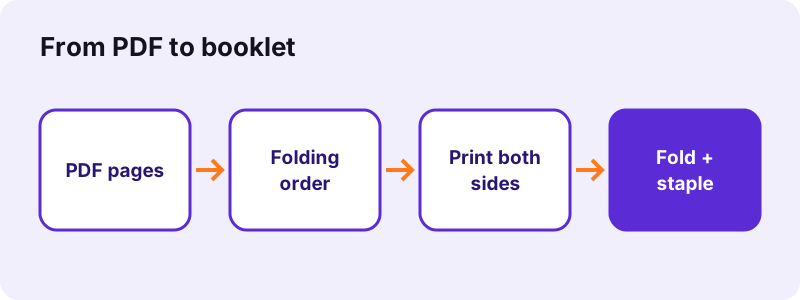
- Fold and staple. Keep the sheets in order, fold the whole stack in the middle and staple along the fold.
What does pdf24 create PDF booklet do?
pdf24 create PDF booklet rearranges and places your pages so that a double-sided print can be folded into a booklet. Each side of a sheet carries two pages next to each other, and the pairs are chosen so that the folded stack reads in order. The page count is filled up to a multiple of four with blank pages.
Our 6-page test document became 4 landscape A4 sides, that is 2 sheets printed on both sides, with 2 blank pages added; the tool's own note said so. A 5-page scan on A3 became 2 sheets of 1190.6 × 841.9 points with 3 blank pages, keeping each page at A4 size.
“Stapling through the centerfold, also called saddle-stitching, joins a set of nested folios into a single magazine issue”
The page order pdf24 create PDF booklet uses
For an 8-page booklet, sheet 1 carries pages 8 and 1 on the front and 2 and 7 on the back; sheet 2 carries 6 and 3 on the front and 4 and 5 on the back. Nested and folded, the sheets read 1 to 8. Longer documents follow the same pattern, sheet after sheet towards the middle.
Blank pages in pdf24 create PDF booklet
Every sheet holds 4 pages, so a 6-page file needs 8 places and gets 2 blank ones at the end, which fall on the inside of the back cover. To control where blanks go, add your own blank pages to the PDF before making the booklet.
Right-to-left binding in pdf24 create PDF booklet
With Right binding the two pages on each side swap places, so the booklet opens from the right like an Arabic, Hebrew or Japanese book. The printing and folding steps stay the same.
pdf24 create PDF booklet: test with one sheet
Before a long run, print only the first sheet on both sides and fold it. If page 2 sits upside down behind page 1, switch the printer to the other flip edge.
Which sheet size suits pdf24 create PDF booklet?
The sheet size decides how big each booklet page becomes. A4 sheets give A5 pages, the usual size for programmes and small manuals. US Letter gives half-letter pages. A3 sheets keep A4 pages full size. Twice the page width makes the sheet exactly two original pages wide, useful for print shops and odd formats.
| Sheet option | Booklet page | Scale of an A4 original |
|---|---|---|
| A4 (297 × 210 mm landscape) | A5, 148 × 210 mm | about 71 % |
| US Letter | half-letter, 5.5 × 8.5 in | about 67 % |
| A3 (420 × 297 mm landscape) | A4, 210 × 297 mm | 100 % |
| Twice the page width | same as the original | 100 % |
“Imposition is one of the fundamental steps in the prepress printing process.”
How many sheets does pdf24 create PDF booklet need?
pdf24 create PDF booklet needs one sheet of paper for every 4 pages, rounded up, because each sheet carries 2 pages on the front and 2 on the back. A 6-page file takes 2 sheets, a 20-page file 5 sheets and a 50-page file 13 sheets, with up to 3 blank pages added at the end.
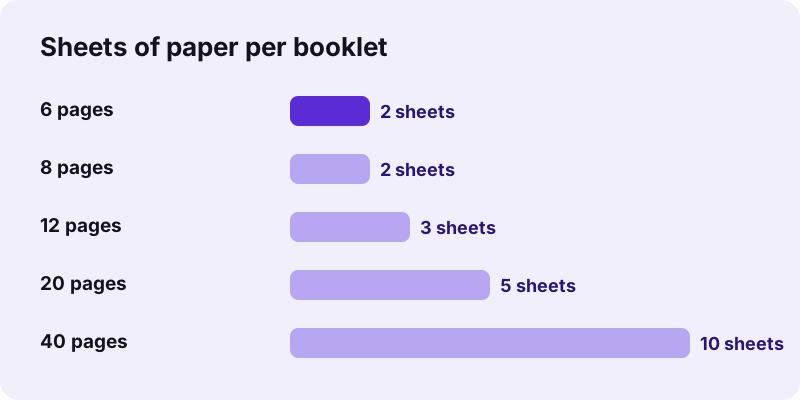
All sheets are nested into one stack and folded together, which is called saddle stitching. Paper of normal office weight folds easily in small stacks; a thick stack gets hard to fold flat, and inner sheets stick out a little at the open edge. For long documents, split the PDF into parts with Split PDF and make one booklet per part.
Print and fold: pdf24 create PDF booklet at the printer
Printing a booklet takes one setting that matters: double-sided with flip on the short edge. Print the PDF at 100 % or Actual size, keep the sheets in the order they come out, fold the whole stack in the middle with the first page outside, and put two or three staples along the fold.
- Open the -booklet.pdf file and choose Print.
- Set double-sided (duplex) and flip on short edge; on some printers it is called short-edge binding.
- Set scale to 100 % and turn off any booklet or pages-per-sheet option of the printer itself.
- Fold the stack in the middle, pressing the fold with a ruler.
- Staple along the fold with a long-reach stapler, or sew it with thread.
Printers without duplex can still do it: print the odd sides, put the stack back in the tray turned over, and print the even sides. Test this with one sheet first.
Is pdf24 create PDF booklet private?
pdf24 create PDF booklet runs in your browser, so the document is never uploaded. The pages are read from your device, arranged in the open tab and saved from memory as a new PDF. No server gets a copy, there is no account, and the file is cleared when the tab closes. The result line confirms 0 bytes uploaded.
Pages are placed as vector content, so text stays sharp and the original fonts and images are kept. For other print layouts see Pages per sheet (several pages on a side in reading order) and Change PDF page size. If the booklet should start on the right page, add a page with Merge PDF first.
pdf24 create PDF booklet: frequently asked questions
Is pdf24 create PDF booklet free?
Yes. pdf24 create PDF booklet is free, with no account and no watermark on the pages. There is no page limit beyond the memory of your device, because the booklet is built by your own phone or computer. Make as many versions as you like to test sheet sizes and binding.
Why does pdf24 create PDF booklet add blank pages?
A folded sheet always carries 4 pages, so the page count must be a multiple of 4. When it is not, the tool adds 1 to 3 blank pages at the end, and its note tells you how many. A 6-page file gets 2 blank pages, a 13-page file gets 3.
Which printer setting does pdf24 create PDF booklet need?
Double-sided printing with flip on the short edge, at 100 % scale. Flip on the long edge turns every back side upside down. Also switch off the printer's own booklet or pages-per-sheet feature, because the PDF is already arranged and a second arrangement would scramble it.
Can pdf24 create PDF booklet make an A5 booklet from A4 pages?
Yes, that is the default. Choose A4 as the sheet size: every A4 page is scaled to about 71 % and placed on half of a landscape A4 sheet, which gives A5 pages after folding. Text stays sharp because the pages are placed as vectors, not as pictures.
Does pdf24 create PDF booklet upload my document?
No. The document is opened by your browser, the booklet is built in the same tab with JavaScript, and the result is saved from your device's memory. Nothing is sent to a server, as the result line confirms with 0 bytes uploaded. It also works offline once the page has loaded.
Can pdf24 create PDF booklet bind on the right?
Yes. Set the binding edge to Right. The two pages on every side swap places, so the booklet opens from the right, as Arabic, Hebrew and Japanese books do. Print and fold it exactly as a left-bound booklet; only the order on each side changes.
How many pages can pdf24 create PDF booklet handle?
The tool has no page limit, but folding has one in practice: a thick stack is hard to fold flat and staple. For long documents, split the PDF into parts of a manageable size with Split PDF, make a booklet from each part, and bind the parts together or keep them as volumes.
What is Twice the page width in pdf24 create PDF booklet?
With that option the sheet is exactly two original pages wide and as tall as one page, so the pages are not scaled at all. It suits print shops that cut paper to size, and unusual formats such as square pages, where A4 or Letter sheets would leave wide white margins.
Does pdf24 create PDF booklet work on a phone?
Yes, in Safari on iPhone and iPad and in Chrome or Samsung Internet on Android, without an app. The booklet PDF is saved to your downloads. Print it from the phone if your printer supports duplex printing over AirPrint or Android printing, or send the file to a computer.
Do the pages lose quality in pdf24 create PDF booklet?
No. Pages are embedded as they are and only scaled to fit the half sheet; text and vector graphics stay sharp, and scans keep their resolution. Our 2.46 MB scan made a 2.47 MB booklet, which shows that nothing was re-compressed along the way.
Is this the official pdf24 create PDF booklet tool?
No. pdf24tools is an independent website and is not affiliated with PDF24 or Geek Software GmbH. This booklet tool is our own code and runs in your browser. We use the name only because people search for it; your files are processed on your device, never on our servers.
pdf24 create PDF booklet: sources
- Bookbinding — Wikipedia
- Imposition — Wikipedia
- ISO 216 paper sizes — Wikipedia