How to use pdf24 tools crop PDF in 4 steps
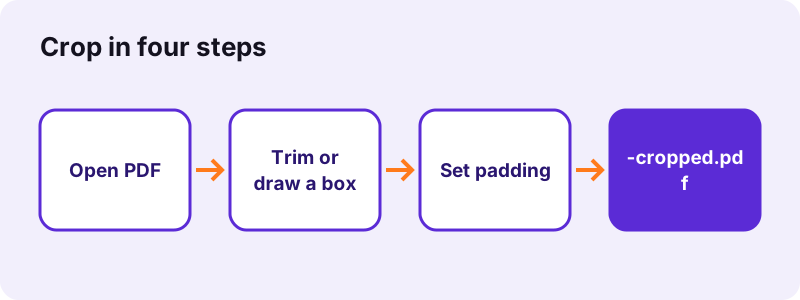
- Choose the PDF. Tap Choose a PDF or drop the file on the box. A preview of the first page appears with a blue box on it.
- Pick the crop mode. Trim white margins cuts each page to its own printed area plus padding. Same box on every page uses the box you drag on the preview for all pages.
- Adjust the box or padding. In trim mode, set the padding (12 pt by default). In box mode, move the blue box or pull its corner to resize it.
- Press Crop PDF and download. The pages are cropped on your device; save the file ending in -cropped.pdf and check it.
What does pdf24 tools crop PDF do?
pdf24 tools crop PDF sets a smaller visible area on every page, so readers and printers show only what is inside it. It can find that area automatically for each page by looking for printed content, or use one box that you draw on the first page. The page content itself is not redrawn, so text stays sharp and selectable.
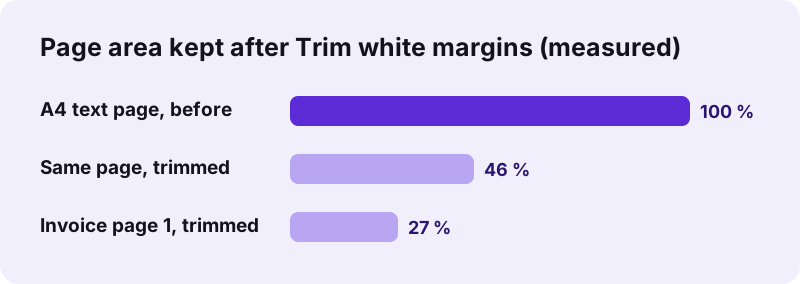
With Trim white margins, our 6-page A4 test document went from 595 × 842 points to 474 × 485 points per page, 46 % of the area, in 0.8 seconds. The first page of a 2-page invoice became 483 × 276 points, and its second page, which holds a single line, 383 × 35 points: each page is trimmed to its own content.
“Cropping is the removal of unwanted outer areas from a photographic or illustrated image.”
pdf24 tools crop PDF: Trim white margins
In this mode the tool renders each page, finds the outermost pixels that are not near-white, and keeps that rectangle plus the padding you set, 12 points (about 4 mm) by default and up to 200. Blank pages are left as they are. Because every page gets its own box, pages of one file can end up with different sizes.
pdf24 tools crop PDF: Same box on every page
Drag the blue box on the preview of page 1 to move it, or pull its corner to resize it; the shaded area is what will be cut. The moment you touch the box, the mode switches to Same box on every page, and that box is applied to all pages at the same position.
pdf24 tools crop PDF for scans with dark edges
Scanner lids often leave grey or black borders. Trim mode treats them as content and keeps them, so draw the box by hand instead and place it just inside the dark edge. One box then cleans every page of the scan.
pdf24 tools crop PDF: padding tip
For printing, keep at least the default 12 points of padding, as many printers cannot print right to the edge of the paper and would cut letters close to it.
Does pdf24 tools crop PDF delete or only hide content?
Cropped content is only hidden. Cropping a PDF sets the visible area of each page, the crop box, but the text and pictures outside it stay inside the file. That is why the tool's message says the trimmed area is hidden, not erased, and why cropping must never be used to remove private information before sharing a document.
- To remove text or numbers for good, use Redact PDF, which burns black boxes into the page.
- To delete whole pages, use Remove PDF pages, which leaves them out of the new file.
- To make the hidden parts disappear from the file, compress the cropped PDF with Compress PDF, which redraws pages as pictures at its stronger levels.
When is pdf24 tools crop PDF useful?
pdf24 tools crop PDF helps when the useful part of a page is surrounded by space or clutter. Wide margins make text tiny on a phone; slides exported with borders waste paper; a scanned receipt sits in the corner of an A4 page. Cutting the page to the content makes it larger on screen and cleaner in print.
| Situation | Mode | Result |
|---|---|---|
| Paper with wide margins, read on a phone | Trim white margins | Text fills the screen width |
| Receipt scanned on an A4 bed | Trim white margins | Page the size of the receipt |
| Scan with dark lid borders | Same box on every page | Borders cut off on all pages |
| Remove a running header from every page | Same box on every page | Header out of view |
To give pages a standard paper size again after cropping, run Change PDF page size on the result; it centres each cropped page on A4 or Letter.
Is pdf24 tools crop PDF safe for private files?
pdf24 tools crop PDF keeps the file on your device from start to finish. The browser reads the PDF, renders the preview, finds the margins and writes the new page boxes in the open tab. No server receives the document, there is no account, and the result line confirms 0 bytes uploaded after every run.
Keep in mind the point above: the file you share still holds the cropped-away parts. The privacy of the tool means nobody else sees your file while you work; it does not turn cropping into redaction.
pdf24 tools crop PDF on phone and computer
pdf24 tools crop PDF works in current Chrome, Edge, Firefox and Safari on Windows, Mac and Linux, and in Safari, Chrome or Samsung Internet on iPhone and Android. Dragging the blue box works with a finger as well as a mouse. Cropping takes about a second per few pages, because each page is rendered once to find its margins.
Our desktop runs took 0.8 s for 6 pages and 1.0 s for a 2-page invoice, longer than rotating or merging because of that render step. Long scans on older phones take proportionally longer; the status line counts the pages as they are cropped.
pdf24 tools crop PDF: frequently asked questions
Is pdf24 tools crop PDF free?
Yes. pdf24 tools crop PDF is free, with no account, no watermark and no page limit beyond the memory of your device. The pages are cropped by your own phone or computer, so nothing costs us server time. You can crop the same file again with other settings as often as you like.
Does pdf24 tools crop PDF delete the cropped area?
No. Cropping hides everything outside the box but keeps it inside the file, as the tool's own message says. Anyone with a PDF editor can restore the full page. To remove sensitive content for good, use Redact PDF, which burns black boxes into the page itself.
Can pdf24 tools crop PDF trim every page differently?
Yes, that is the Trim white margins mode. Each page is analysed on its own and cut to its printed area plus the padding, so a full page and a half-empty last page get different boxes. If all pages must keep one size, use Same box on every page instead.
How does pdf24 tools crop PDF cut all pages the same way?
Drag or resize the blue box on the preview of the first page. As soon as you touch it, the mode switches to Same box on every page, and the box is applied to every page at the same position. That suits scans and slides where the unwanted border is in the same place on each page.
Does pdf24 tools crop PDF upload my document?
No. The document is opened, previewed and cropped by your browser in the same tab. No byte is sent to a server, and the result line says 0 bytes uploaded. Once the page has loaded, cropping even works with the network switched off.
Does pdf24 tools crop PDF reduce quality?
No. Only the visible area of each page changes; text, vector graphics and images are not redrawn or compressed. Typed text stays selectable, and scans keep their full resolution inside the box. Our cropped test file was 4.3 KB against 5.1 KB before, with identical text.
Why did pdf24 tools crop PDF keep a grey border?
Trim white margins keeps everything that is not near-white, and scanner borders, page shadows and grey backgrounds count as content. Switch to Same box on every page and drag the box inside the border, or set the padding to 0 if only the padding is the problem.
What is the padding in pdf24 tools crop PDF?
Padding is the space kept around the detected content in Trim white margins mode, from 0 to 200 points; the default is 12 points, about 4 mm. Larger padding leaves more breathing room around the text, zero padding cuts right to the outermost printed pixel.
Can pdf24 tools crop PDF crop only one page?
The tool crops every page of the file. To crop one page only, extract it with Extract PDF pages, crop that file, and put it back in place with Merge PDF and Rearrange PDF pages. Each step runs on your device and takes a few seconds.
Does pdf24 tools crop PDF work on a phone?
Yes, in Safari on iPhone and iPad and in Chrome or Samsung Internet on Android, without an app. The blue box can be moved and resized with a finger on the preview. The cropped PDF is saved to your downloads and reads more comfortably on the small screen.
Is this the official pdf24 tools crop PDF tool?
No. pdf24tools is an independent website and is not affiliated with PDF24 or Geek Software GmbH. This crop tool is our own code that runs in your browser. We use the name only because people search for it; your files are processed on your device, never on our servers.
pdf24 tools crop PDF: sources
- Cropping (image) — Wikipedia
- PDF — Wikipedia
- File API — MDN Web Docs