How to use pdf24 remove pages from PDF in 4 steps
- Choose the PDF. Tap Choose a PDF or drop the file on the box. A thumbnail of every page appears, numbered.
- Mark the pages to delete. Tap × under a page to mark it (tap again to unmark), or type page numbers such as 1, 7-9 in the Pages box. Both ways can be combined.
- Press Remove pages. The pages you keep are copied into a new file on your device; the marked pages are left out.
- Download the copy. Save the file ending in -edited.pdf and check the page count. The original file is not changed.
What does pdf24 remove pages from PDF do?
pdf24 remove pages from PDF makes a copy of your document without the pages you mark. You mark pages by tapping × under their thumbnails or by typing their numbers. The pages you keep are copied unchanged into a new file, so text, images and quality stay exactly as before, and the original stays on your device.
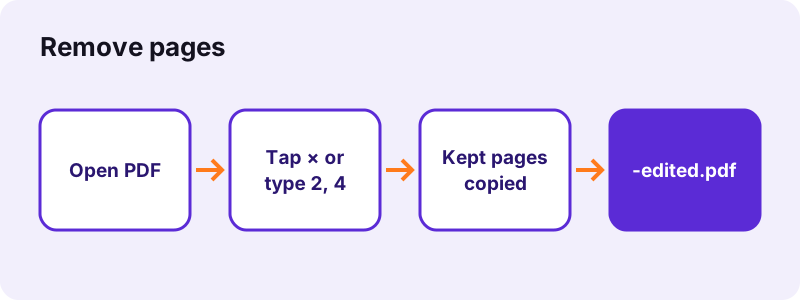
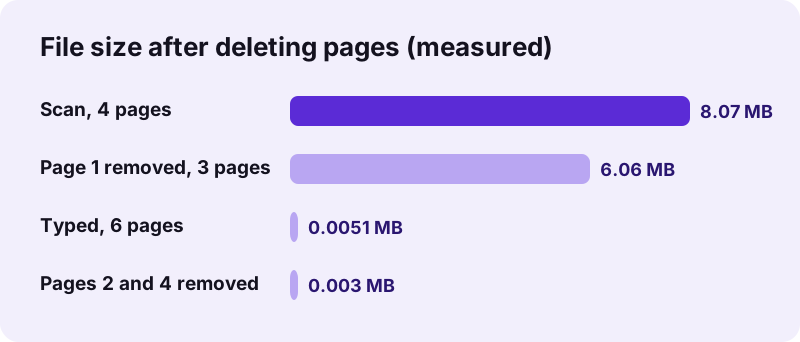
In our tests, tapping pages 2 and 4 of a 6-page typed file gave a 4-page copy with pages 1, 3, 5 and 6, in 0.2 seconds. Typing 1 for a 4-page scan of 8,463,060 bytes gave a 3-page file of 6,355,482 bytes, 24.9 % smaller, because the scan of page 1 was not copied into it.
Delete pages by tapping in pdf24 remove pages from PDF
Tapping is the quickest way when you can see the pages. A marked page is greyed out and its × button stays pressed. Tap it again to keep the page after all. The thumbnails show the first 200 pages of a file; for later pages, type the numbers instead.
Delete pages by number with pdf24 remove pages from PDF
The Pages box takes single numbers and runs: 3, 8-10 deletes pages 3, 8, 9 and 10. A run without an end, such as 21-, deletes from page 21 to the last page, which is handy to cut an appendix off a long report.
Combine both ways in pdf24 remove pages from PDF
Pages you tap and pages you type are added together. Tap the two blank pages you can see, type 40-52 for the appendix you cannot, and one press of the button deletes all of them.
pdf24 remove pages from PDF: what you cannot delete
You cannot delete every page; the tool asks you to keep at least one. If nothing is marked, it asks you to pick a page first. Both checks stop the run before any file is written.
Are deleted pages really gone after pdf24 remove pages from PDF?
Yes. pdf24 remove pages from PDF does not just hide pages: it builds a new PDF holding only the pages you keep. Pictures, fonts and text used only by deleted pages are therefore not in the new file. Our scan test shows it: the file shrank from 8.07 MB to 6.06 MB.
That matters when a page holds something private, such as a bank account number on page 3 of a statement you must forward. Some editors delete a page from the page list but leave its data inside the file, where recovery tools can still find it. A fresh copy avoids that.
To hide part of a page rather than a whole page, use Redact PDF, which burns black boxes into the page.
Is pdf24 remove pages from PDF safe for private files?
pdf24 remove pages from PDF is safe because the document never leaves your phone or computer. The browser reads the PDF with the File API, the new copy is assembled by JavaScript in the same tab, and the download comes from your own memory. No server receives the file or a copy of any page.
“The File API enables web applications to access files and their contents.”
After each run the result line shows the time taken and 0 bytes uploaded. There is no account and no file history. Closing the tab removes the document from memory.
When should you use pdf24 remove pages from PDF?
Deleting PDF pages helps whenever a file carries more pages than the receiver needs. Typical cases are blank pages from a duplex scanner, a cover sheet an upload portal rejects, pages with personal data, outdated price lists inside a brochure, or an appendix that makes a file too large to email.
- Scans: duplex scanners add a blank back for every one-sided sheet; delete them in one go by tapping.
- Applications: remove the instruction pages of a form before uploading the filled pages.
- Contracts: send a counterpart only the pages they must sign.
- Reports: drop the draft cover and keep the final one.
- Size limits: an appendix of scans can be half of a file's weight.
| Goal | Best tool |
|---|---|
| Delete a few pages, keep the rest | Remove PDF pages |
| Keep only a few pages | Extract PDF pages |
| Break the file into parts | Split PDF |
| Change the order | Rearrange PDF pages |
| Make the file smaller | Compress PDF |
pdf24 remove pages from PDF on iPhone, Android and desktop
pdf24 remove pages from PDF runs in any current browser without an app: Safari on iPhone and iPad, Chrome or Samsung Internet on Android, and Chrome, Edge, Firefox or Safari on Windows, Mac, Linux and Chromebook. Thumbnails are large enough to tap on a phone screen, and the copy lands in your normal downloads folder.
On a phone, pinch to zoom out if you need to see more thumbnails at once. On a computer, typing ranges is often faster than clicking. After saving, check the result in the browser's own PDF viewer before you send it, and use Add page numbers if the page numbering should start fresh.
pdf24 remove pages from PDF: frequently asked questions
Is pdf24 remove pages from PDF free?
Yes. Deleting pages costs nothing, needs no account and puts no watermark on the copy. There is no daily limit, because the work runs on your own device. You can open the same file again and delete other pages as often as you need, since the original is never changed.
Does pdf24 remove pages from PDF change my original file?
No. The tool reads the original and writes a new copy that ends in -edited.pdf. The original keeps all its pages. If you want to replace it, delete the old file yourself after checking the copy, or keep both until you are sure the right pages are gone.
How do I delete blank pages with pdf24 remove pages from PDF?
Open the scan, look through the thumbnails and tap × under every blank page; marked pages turn grey. Press Remove pages and save the copy. For a long scan where every second page is blank, typing the numbers, such as 2, 4, 6, 8, can be faster than tapping.
Can I undo pdf24 remove pages from PDF?
Before you press the button, yes: tap × again on a marked page to keep it, or edit the numbers. After saving, the copy lacks those pages, but your original file still has them all, so you can simply start again from the original with a different selection.
Does pdf24 remove pages from PDF upload the document?
No. The document is opened by your browser and the new copy is built in the same tab; nothing is sent to any server. The result line confirms 0 bytes uploaded. That makes it suitable for statements, medical letters and contracts that must not be shared with a third party.
Why can't pdf24 remove pages from PDF delete every page?
A PDF needs at least one page, so the tool refuses a selection that would leave nothing and asks you to keep one page. If you want to get rid of the whole document, delete the file on your device instead. If you want only a few pages, Extract PDF pages is the shorter route.
Does pdf24 remove pages from PDF make the file smaller?
Usually, yes, by about the weight of the pages removed. Deleting one scanned page from a 4-page scan took our file from 8.07 MB to 6.06 MB. On typed documents the saving is small in bytes, since each text page is only a few kilobytes; fonts shared with kept pages stay in the file.
Can pdf24 remove pages from PDF open a protected file?
Only if you can open it. A PDF that needs a password stops with a message; remove the password first with Unlock PDF using the password you know, delete the pages from the unlocked copy, then protect the copy again with Lock PDF if it must stay locked.
Does pdf24 remove pages from PDF keep bookmarks?
No. The copy is built from the kept pages only, and the bookmark outline of the original is not carried over. Links and comments on the kept pages stay. If the edited file needs bookmarks, add them in a minute with Bookmark PDF, which suggests one entry per page.
Can I use pdf24 remove pages from PDF on a phone?
Yes. The tool works in Safari on iPhone and iPad and in Chrome or Samsung Internet on Android. Tap × under each page to remove, press Remove pages, and the copy is saved to your downloads. From there you can share it by mail or messenger like any other file.
Is this the official pdf24 remove pages from PDF tool?
No. pdf24tools is an independent website and is not affiliated with PDF24 or Geek Software GmbH. This tool is our own code and runs in your browser. We use the name only because people search for it; your documents are processed on your device, never on our servers.
pdf24 remove pages from PDF: sources
- File API — MDN Web Docs
- PDF — Wikipedia
- PDF (Portable Document Format) Family — Library of Congress