How to use pdf24 PDF to RTF in 4 steps
- Choose the PDF. Tap Choose a file or drop one PDF on the box. It stays on your device.
- Decide on page breaks. Mark where each page starts inserts an RTF page break between PDF pages; untick it for one continuous text.
- Press Convert to RTF. Text PDFs are done in well under a second.
- Open the .rtf. Double-click it: WordPad, TextEdit, Word or LibreOffice Writer opens it with the formatting.
What is RTF, and what does pdf24 PDF to RTF produce?
pdf24 PDF to RTF produces a Rich Text Format file: plain characters with control words such as \b for bold and \par for a paragraph end. RTF dates from 1987 and is read by nearly every word processor, which makes it the safest choice when you do not know which editor will open the file.
“The Rich Text Format is a legacy proprietary document file format with published specification developed by Microsoft Corporation from 1987 until 2008 for cross-platform document interchange with Microsoft products.”
Our files start with an A4 page (11,906 × 16,838 twips), 2 cm margins on every side and Arial at 11 pt as the default font. Headings are written bold with extra space above and a keep-with-next rule, so a heading never sits alone at the bottom of a page.
pdf24 PDF to RTF formatting rules
Each paragraph keeps its relative size: the body text of the PDF is mapped to 11 pt and larger lines scale up from there, between 8 and 36 pt. Bold and italic runs are kept word by word, centred lines stay centred and right-to-left paragraphs are flagged as such.
pdf24 PDF to RTF tables
Column-aligned text becomes a real RTF table with a border on every cell and a bold first row. Our invoice table (Item, Qty, Unit price, Total) came out as 6 rows × 4 cells; column widths follow the widths in the PDF, with at least 0.4 inch per column.
pdf24 PDF to RTF and special characters
Characters outside basic ASCII, such as é, ü, Arabic or Chinese letters, are written as \u Unicode escapes with a ? fallback, the method the RTF specification defines. Modern editors show the real letters; a very old reader that ignores \u shows the question marks.
pdf24 PDF to RTF tip for old software
If an old program shows question marks instead of accented letters, open the .rtf in WordPad or LibreOffice first and save it again; or copy only the words with PDF to TXT, which writes UTF-8 plain text.
When is pdf24 PDF to RTF better than Word or ODT?
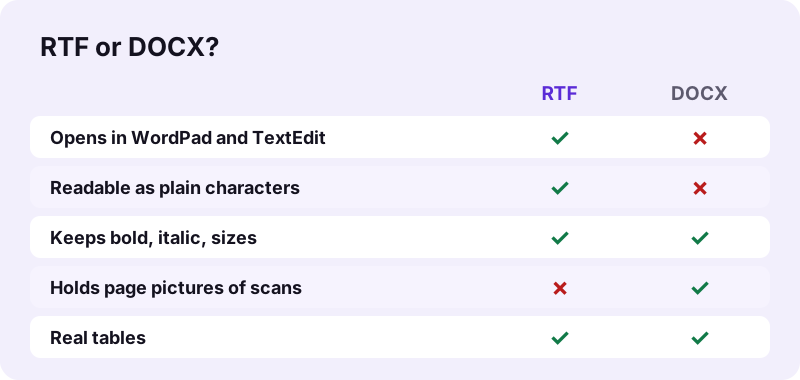
pdf24 PDF to RTF is better when the reader's software is unknown or old: WordPad, TextEdit on a Mac, email programs, legal and medical systems that import .rtf, or a Word version from the 1990s. For everyday editing in a modern office suite, a .docx or .odt keeps the same text with more structure.
| You need | Best tool |
|---|---|
| Any editor, even very old ones | PDF to RTF (this page) |
| Microsoft Word, Google Docs | PDF to Word |
| LibreOffice, open formats | PDF to ODT |
| Words only, no formatting | PDF to TXT |
Why is my pdf24 PDF to RTF file empty?
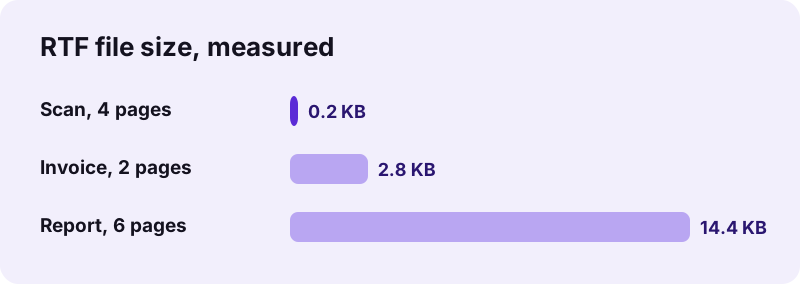
An empty RTF means the PDF has no text layer, which is the case for scans and photographed pages. pdf24 PDF to RTF writes text only and never embeds pictures, so our 4-page scan produced a 219-byte file containing just three page breaks, and the result line warned that 4 pages had no selectable text.
Fix it in two steps: run OCR PDF to add a text layer, then convert the OCR result to RTF. If you need the page images rather than the words, choose PDF to Word, which places scanned pages as pictures.
- Scan in 300 dpi for better OCR.
- Check that the PDF text can be selected: if you cannot highlight a word in a PDF viewer, it is a scan.
- Photos and charts on text pages are not in the RTF either; save them with Extract images.
pdf24 PDF to RTF results we measured
We converted three of our test files to Rich Text in Chrome on Windows 10. Text PDFs gave small Rich Text files in well under a second; the scan gave an almost empty file because it holds no text. The network log showed 0 upload requests for every run, since the file is built in the browser.
| Test PDF | .rtf size | Time | What is inside |
|---|---|---|---|
| Report, 6 pages, 5.1 KB | 14.4 KB | 0.6 s | 6 bold headings, 6 paragraphs, page breaks |
| Invoice, 2 pages, 2.4 KB | 2.8 KB | 0.3 s | heading, 2 paragraphs, 6 × 4 table |
| Scan, 4 pages, 8.07 MB | 219 bytes | 8.5 s | only page breaks: no text layer |
RTF is larger than DOCX for the same text (14.4 KB against 2.9 KB for our report) because it is not zipped: every control word is stored as readable characters. Zip the file if size matters.
Is pdf24 PDF to RTF private?
pdf24 PDF to RTF is private because the PDF is never uploaded. Your browser reads the file through the File API and JavaScript writes the Rich Text in memory; the download is a local file. We logged 0 upload requests in our tests, and the result line confirms 0 bytes uploaded.
No account, no storage, no copy on a server. The File API on MDN explains how a page can read a local file without sending it.
pdf24 PDF to RTF on Windows, Mac, Linux and phones
pdf24 PDF to RTF runs in Chrome, Edge, Firefox and Safari on Windows, macOS, Linux, Android and iOS. On Windows 10 the .rtf opens in WordPad, on a Mac in TextEdit, on Linux in LibreOffice Writer, and on phones in Word, Google Docs or the Files preview.
Done editing? Turn the Rich Text back into a PDF with RTF to PDF, which also runs on your device.
pdf24 PDF to RTF: frequently asked questions
Is pdf24 PDF to RTF free?
Yes. It is free with no sign-up, no watermark and no limit on files. The conversion runs on your device, so we have no server cost per file. Convert one PDF, save the .rtf, then convert the next; every result is a plain file you can keep, edit and send.
Which programs open a pdf24 PDF to RTF file?
Almost all of them: WordPad on Windows 10, TextEdit on macOS, Microsoft Word on every platform, LibreOffice and OpenOffice Writer, Google Docs after upload, and many email and records programs that import Rich Text. That wide support is the main reason to choose RTF over DOCX or ODT.
Does pdf24 PDF to RTF include images?
No. The RTF output contains text only: paragraphs, headings, bold, italic, sizes and tables. Photos, charts and scanned pages are not embedded, which is why a scan gives an almost empty file. Use PDF to Word if you need page pictures, or Extract images to save the pictures separately.
Why does pdf24 PDF to RTF give a 219-byte file?
Because the PDF is a scan. A scanned page is a picture without letters, so there is no text to write; our 4-page scan gave exactly 219 bytes with three page breaks. Run OCR PDF on the scan first, then convert again to get the words.
Does pdf24 PDF to RTF keep tables?
Yes, when the PDF text is aligned in columns. Those lines become a real RTF table with borders on every cell and a bold header row; our invoice gave a 6-row, 4-column table. Tables with merged cells may come out as separate lines that you can rebuild in your editor.
Does pdf24 PDF to RTF upload my file?
No. The PDF is read and converted inside your browser. In our tests the page sent 0 upload requests and the result line showed 0 bytes uploaded. You can check it in your browser's developer tools: open the Network tab, convert a file and watch that no request carries your document.
Is this pdf24 PDF to RTF tool from PDF24?
No. pdf24tools is an independent website, not affiliated with PDF24 or Geek Software GmbH. Our converter is our own code: it runs in your browser, uploads nothing and needs no account. We use familiar page names so the tool is easy to find, but the site, code and team are separate.
Can pdf24 PDF to RTF handle accented and non-Latin letters?
Yes. Every character outside basic ASCII is written as an RTF Unicode escape, so French, German, Polish, Arabic, Hebrew, Chinese and other scripts survive. Right-to-left paragraphs are marked right to left. Very old readers that ignore Unicode escapes may show question marks instead.
What does Mark where each page starts do in pdf24 PDF to RTF?
It writes an RTF page break between PDF pages, so page 2 of the PDF starts on a new page in your editor. Untick it to get one continuous text that reflows freely, which is easier if you plan to rearrange the content or paste it into another document.
Why is a pdf24 PDF to RTF file larger than a DOCX?
RTF stores every formatting command as readable text and is not compressed, while DOCX is a ZIP archive. Our 6-page report gave 14.4 KB as RTF and 2.9 KB as DOCX with the same words. Zip the RTF if you need to email many of them.
Can I use pdf24 PDF to RTF on an iPhone?
Yes. Open the page in Safari, tap Choose a file, pick the PDF from Files and tap Convert to RTF. The .rtf is saved in Files → Downloads, where the Files preview, Pages or Word opens it. Nothing is installed and the PDF stays on the phone.
How do I turn a pdf24 PDF to RTF file back into a PDF?
Use RTF to PDF on this site, which converts in your browser, or print the document to PDF from WordPad, TextEdit or Word. Both keep your edits. TextEdit on a Mac also offers File → Export as PDF directly. If the new PDF is too large to email, run it through Compress PDF afterwards.
More pdf24 PDF to RTF tools and guides
pdf24 PDF to RTF: sources
- Rich Text Format — Wikipedia
- File API — MDN Web Docs
- Rich Text Format (RTF) Family — Library of Congress