How to use pdf24 extract images in 4 steps
- Choose the PDF. Tap Choose a file or drop one PDF on the box. It is read in your browser and never uploaded.
- Pick PNG or JPG. PNG (lossless) keeps every pixel; JPG (smaller) suits photos and scans.
- Skip tiny images. Keep the default to skip pictures smaller than 32 px, choose 100 px to drop icons too, or Keep all.
- Extract and download. Press Extract images. One picture downloads directly; several arrive in one ZIP.
What does pdf24 extract images take out of a PDF?
pdf24 extract images saves the raster pictures embedded in a PDF: photos, scanned pages, screenshots, charts saved as images and logos. Each one comes out at the resolution stored in the file, so a photo shown as a small thumbnail on the page is saved as the full camera picture if that is what the PDF contains.
Our test PDF had, on page 1, a photo of 3,024 × 4,032 pixels shown about 9 cm wide, a 1,200 × 800 chart and a 24 × 24 pixel icon, and on page 2 two more photos. With the default settings the tool saved 4 pictures; the photo and the chart came out at exactly their original pixel sizes. Files are named by page and order, such as report-p1-img2.png.
“The data stored in an image file format may be compressed or uncompressed.”
pdf24 extract images from a scanned PDF
A scanned PDF is a stack of page photos, so pdf24 extract images gives you the scans themselves at scanner resolution. Our 4-page scan gave four 2,480 × 3,508 pixel images in 9.7 seconds, and a 5-page contract scan five 1,653 × 2,339 images in 2.0 seconds as JPG. That is the sharpest copy of a scan you can get from the PDF.
pdf24 extract images and repeated pictures
A logo or photo used several times on the same page is saved once for that page. The same picture on another page is saved again, as our test showed: the photo reused on page 2 appeared as a second file of identical size. Delete duplicates after unzipping if you only need one copy.
pdf24 extract images and the skip-tiny filter
PDFs often contain tiny images: bullets, icons, 1-pixel lines and transparency masks. The default skips anything smaller than 32 px on either side, which removed our 24 px icon; Keep all saved it as a 135-byte PNG. Choose Smaller than 100 px to keep only real photos and charts.
pdf24 extract images tip for product photos
Catalogues and brochures often hold far larger photos than the page shows. Run pdf24 extract images as JPG with Smaller than 100 px skipped: you get the photos in print quality without the icons and decorations, ready to reuse in a shop listing or a slide.
PNG or JPG: which format should pdf24 extract images use?
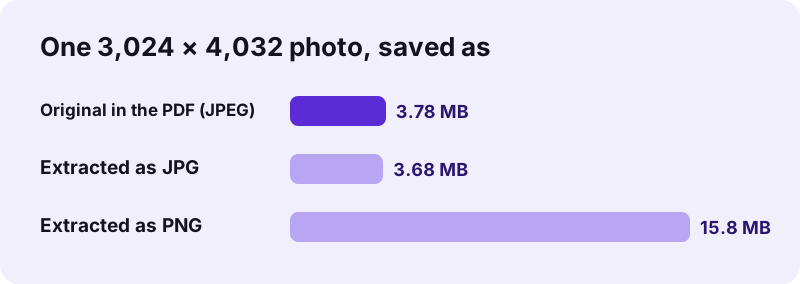
With pdf24 extract images, choose JPG for photos and scans: the pictures were usually JPEGs inside the PDF, so the extracted JPG keeps about the same size. Choose PNG for charts, screenshots, logos and line art, where lossless storage keeps sharp edges. PNG of a photo is large: our 3.78 MB photo became a 15.8 MB PNG.
| Test file | PNG (lossless) | JPG (smaller) | Time |
|---|---|---|---|
| Photos + chart, 4 images | ZIP 47.4 MB | ZIP 11.1 MB | 8.7 s / 13.0 s |
| Scan, 4 pages | ZIP 34.7 MB | ZIP 8.15 MB | 9.7 s / 12.1 s |
| Contract scan, 5 pages | not measured | ZIP 2.81 MB | 2.0 s |
| Chart 1,200 × 800 | 32.5 KB | 45.5 KB | — |
The chart line is the exception that proves the rule: a flat-colour graphic was smaller as PNG (32.5 KB) than as JPG (45.5 KB). The tool decodes every picture and saves it again, so the files are new PNG or JPG files at the original pixel size, not byte-for-byte copies of the data inside the PDF; JPG is saved at 92 % quality.
How is pdf24 extract images different from PDF to JPG?
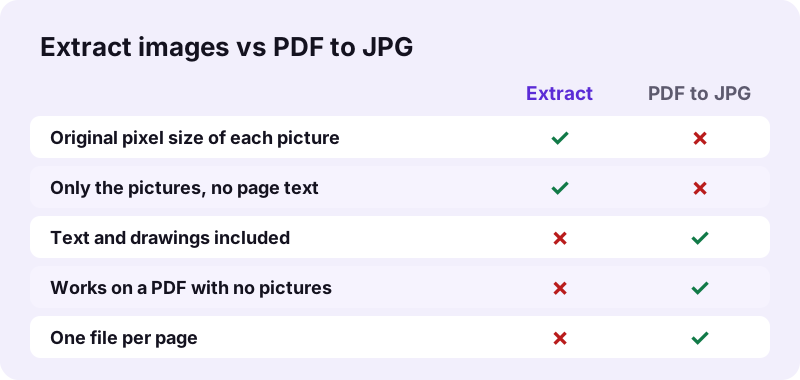
pdf24 extract images saves only the pictures embedded in the PDF, each at its own resolution, and ignores text and drawings. PDF to JPG takes a snapshot of whole pages, with text, vector graphics and pictures together, at a resolution you choose. Use extraction to reuse photos, and page conversion to share pages as they look.
- Vector drawings are not images: charts made in Excel or PowerPoint and exported as PDF are usually drawn with lines, not stored as pictures, so nothing is extracted for them. Use PDF to PNG or PDF to SVG for such pages.
- A text-only PDF has no images: our 6-page text PDF returned the message No images found in this PDF.
- Whole pages as pictures: PDF to JPG or PDF to images.
- The text instead: PDF to TXT.
Is pdf24 extract images safe for private PDFs?
pdf24 extract images works without uploading: your browser reads the PDF with the File API, decodes the pictures with JavaScript and builds the ZIP on your device. Our tests logged 0 upload requests in every run, and the result line confirmed 0 bytes uploaded. Family photos, ID scans and medical images stay with you.
You can check it in the Network tab of the browser's developer tools (F12): only the page and its scripts load. The File API on MDN explains how a page reads a local file without sending it. No watermark is added to any picture.
pdf24 extract images on iPhone, Android and computers
pdf24 extract images runs in Safari, Chrome, Edge and Firefox on iPhone, iPad, Android, Windows, macOS and Linux, without installing anything. A single picture downloads directly; several come in a ZIP that the Files app on iPhone and Android opens with a tap, from where you can save the photos to your gallery.
Extracted photos can be large: PNG copies of our camera photos were about 15.8 MB each. On a phone, choose JPG to keep the ZIP manageable; our 4 photos and chart made an 11.1 MB ZIP as JPG against 47.4 MB as PNG.
pdf24 extract images problems and fixes
When pdf24 extract images finds nothing or the result is not what you expected, the PDF usually explains it: there are no embedded pictures, the graphics are vectors, the file is password-protected or the pictures are tiny and filtered out. The fixes below cover each case.
| Symptom | Cause | Fix |
|---|---|---|
| No images found in this PDF | Text only, or vector graphics | Use PDF to PNG for the page |
| A logo or icon is missing | Smaller than the skip size | Choose Keep all |
| The same photo twice | Used on two pages | Delete the duplicate |
| Password error | PDF needs a password to open | Unlock PDF first |
| ZIP is huge | Photos saved as PNG | Extract again as JPG |
pdf24 extract images: frequently asked questions
Is pdf24 extract images free?
Yes. There is no account, no watermark and no limit on PDFs or pictures. The extraction runs in your own browser, so there is no server cost per file. You can run the same PDF twice, once as PNG and once as JPG, to compare the results before you keep one.
Does pdf24 extract images keep the original quality?
It keeps the original pixel size of every picture, such as 3,024 × 4,032 for our test photo. The pictures are decoded and saved again, so PNG is lossless and JPG is saved at 92 % quality. For photos that were JPEGs in the PDF, the JPG result was about the same size as the original.
Does pdf24 extract images upload my PDF?
No. The PDF is read and its pictures decoded inside your browser; the ZIP is built on your device. We logged every network request in our tests: 0 uploads, and the result line said 0 bytes uploaded. That matters for scans of IDs, contracts and private photos.
Why does pdf24 extract images say no images found?
The PDF has no embedded raster pictures. That is normal for text documents, and for charts and drawings exported from Office or design programs as vector graphics. Our 6-page text PDF gave this message. To get such pages as pictures, use PDF to PNG or PDF to JPG instead.
Can pdf24 extract images get pictures from a scanned PDF?
Yes. Each scanned page is one embedded picture, so you get the scans at full scanner resolution. Our 4-page scan gave four 2,480 × 3,508 pixel images, and a 5-page contract scan five 1,653 × 2,339 pixel JPGs in 2.0 seconds. Pick JPG to keep the files small.
Why are pdf24 extract images PNG files so large?
PNG stores every pixel without lossy compression, so a camera photo becomes much larger than its JPEG original: our 3.78 MB photo was 15.8 MB as PNG, about 4 times more. Choose JPG for photos and scans; keep PNG for charts, screenshots and logos, where it is often smaller.
Is this pdf24 extract images tool made by PDF24?
No. pdf24tools is an independent website and is not affiliated with PDF24 or Geek Software GmbH. The extractor here is our own code: it runs in your browser, uploads nothing and needs no sign-up. The names are similar so the tool is easy to find, but the site and team are separate.
What does skip tiny images do in pdf24 extract images?
It leaves out pictures smaller than the size you pick on either side: 32 px by default, 100 px, or Keep all. PDFs often hide icons, bullets and masks as small images. In our test the default removed a 24 × 24 pixel icon, which Keep all saved as a 135-byte PNG.
Can I use pdf24 extract images on an iPhone?
Yes. Open the page in Safari, tap Choose a file, pick the PDF in Files and tap Extract images. The ZIP is saved in Files → Downloads; tap it to unpack, open a picture and tap Share → Save Image to add it to Photos. Choose JPG to keep downloads small.
Does pdf24 extract images save vector graphics?
No. Vector graphics are drawn from lines and shapes, not stored as pixels, so there is nothing to extract. Charts from Excel and many logos are vectors in a PDF. Save such pages as pictures with PDF to PNG, or as editable vectors with PDF to SVG.
How long does pdf24 extract images take?
It depends on the size of the pictures. Our 5-page contract scan took 2.0 seconds as JPG, the 4-page scan 9.7 seconds as PNG and our photo PDF 8.7 seconds, in Chrome on a Windows laptop. Large camera photos take longest because each one must be decoded and encoded again.
Does pdf24 extract images remove duplicates?
Partly. A picture repeated on the same page is saved once for that page, but the same picture on another page is saved again. In our test a photo used on pages 1 and 2 came out as two identical files, so delete the extra copy after unzipping.
pdf24 extract images: sources
- Image file format — Wikipedia
- Raster graphics — Wikipedia
- File API — MDN Web Docs