How to use pdf24 RTF to PDF in 4 steps
- Choose the .rtf. Drop one or more .rtf files on the box, or tap Choose files.
- Pick A4 or Letter. The page size applies to every file in the batch.
- Press Convert to PDF. The RTF control words are read and the text is laid out on your device.
- Download the PDF. Save it, or the ZIP for several files.
What is an RTF file and how does pdf24 RTF to PDF read it?
An RTF file is Rich Text Format: readable text mixed with control words such as \b for bold, \i for italic and \par for a new paragraph, all inside braces that start with {\rtf1. pdf24 RTF to PDF reads those control words one by one in your browser and turns the text into PDF paragraphs.
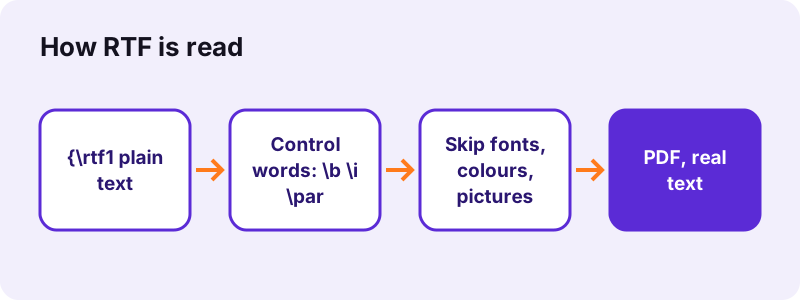
Because RTF is a text format, you can open any .rtf in Notepad and see its structure. Groups in braces carry formatting that ends when the group closes, which is how the reader knows that only the words between \b and \b0 are bold.
“Most word processors are able to read and write some versions of RTF.”
Accents and symbols in pdf24 RTF to PDF
RTF writes non-ASCII letters as escapes: \'e9 is é in the Windows-1252 code page, and \u8364? is the euro sign as a Unicode number, followed by a fallback character that the reader skips. Both kinds came out right in our test.
pdf24 RTF to PDF and smart punctuation
Control words for curly quotes, en and em dashes and bullets (\lquote, \rdblquote, \endash, \emdash, \bullet) become the real characters, so typography from Word survives.
pdf24 RTF to PDF with headings
Paragraphs with an outline level (\outlinelevel0 to 5) become headings of six sizes. RTF from WordPad rarely has them; RTF saved by Word often does.
pdf24 RTF to PDF tip for TextEdit users
On a Mac, TextEdit saves .rtf by default; a file with pictures is saved as .rtfd, a folder, which this tool cannot read. Remove the pictures or export as PDF from TextEdit.
What does pdf24 RTF to PDF keep, and what does it skip?
pdf24 RTF to PDF keeps paragraphs, line breaks, tabs, page breaks, bold, italic, outline headings, tables and every accented or Unicode character. It skips the font table, colours, pictures, headers, footers, footnotes and comments, and uses Noto Sans for all text. Underline and alignment are not kept either.
| RTF element | In the PDF |
|---|---|
| \par, \line, \tab, \page | Paragraphs, line breaks, tabs, page breaks |
| \b, \i | Bold, italic |
| \outlinelevel | Headings |
| \intbl, \cell, \row | Table grid |
| \'xx, \uN | Accents, symbols, any Unicode letter |
| \fonttbl, \colortbl | Skipped (Noto Sans, black text) |
| \pict pictures | Skipped |
| \header, \footer, \footnote | Skipped |
| \ul, \qc (underline, centring) | Not applied |
Field instructions are skipped and their results kept, so a date field prints the date, not the code behind it.
How fast is pdf24 RTF to PDF? Measured
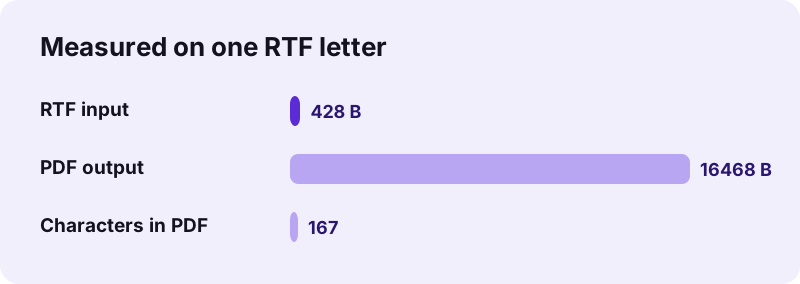
pdf24 RTF to PDF converted our 428-byte test letter, with a bold title, italic and bold words, é, ï, €, a forced line break and a 2 × 2 table, into a 1-page A4 PDF of 16,468 bytes in 0.9 seconds. All 167 characters could be selected and copied.
| Measure | Value |
|---|---|
| Input | dc-letter.rtf, 428 B |
| Output | 1 page, 16,468 B, A4 |
| Time (tool) | 0.9 s |
| Characters extractable | 167 |
| Fonts | Noto Sans Regular, Bold, Italic |
| Uploaded | 0 bytes |
The PDF is much larger than the RTF because it embeds subsets of three font styles; that is what makes the letter look the same on every device.
Is pdf24 RTF to PDF private?
pdf24 RTF to PDF never uploads the file. The browser reads the .rtf with the File API, JavaScript parses it in memory, and the result line confirms 0 bytes uploaded. Letters, notes and old documents saved from WordPad stay on your own computer or phone, with no account needed.
How it works: File API on MDN.
pdf24 RTF to PDF after WordPad: opening RTF files on Windows 11
Windows 11 removed WordPad in a 2024 update, and with it the built-in way to open .rtf files. Converting them to PDF is a simple way to read, print or share them without installing a word processor, and the PDF opens in Edge, which every Windows 11 PC has.
“Since Windows 11 removed WordPad in an update, it is no longer able to open them without additional software.”
- Read or print: convert here, then open the PDF in Edge.
- Edit: open the .rtf in Word, LibreOffice Writer or Google Docs.
- Archive many: convert a folder in one batch; the ZIP holds one PDF per file.
pdf24 RTF to PDF on Mac, iPhone and Android
The converter runs in Safari, Chrome, Edge and Firefox, so the same page works on a Mac, an iPhone or iPad, an Android phone and a Chromebook. Save the .rtf to the device first, then pick it with Choose files.
- Mac: drag the .rtf from Finder onto the box.
- iPhone/iPad: Files → Downloads → the .rtf.
- Android: Download folder or Drive.
pdf24 RTF to PDF for files from old programs
Many old programs exported RTF: address books, legal software, early e-mail clients. Their files are often RTF version 1.x and convert fine, because the core control words have not changed since.
Fixing pdf24 RTF to PDF problems
When a conversion fails or looks wrong, the cause is usually a file that is not real RTF, or formatting that RTF stores but the converter skips.
- "Could not open": the file does not start with {\rtf; it may be a renamed .doc (use DOC to PDF) or plain text (use TXT to PDF).
- Pictures missing: RTF pictures are skipped; save as .docx and use Word to PDF.
- Centred title on the left: alignment is not applied.
- .rtfd folder from TextEdit: not readable; export as PDF in TextEdit.
pdf24 RTF to PDF: frequently asked questions
Is pdf24 RTF to PDF free?
Yes. It is free, with no sign-up, no watermark and no limit, because your own device does the work. pdf24tools is an independent website and is not affiliated with PDF24 or Geek Software GmbH; we use the name only because it is what people search for. Every tool on the site runs in the browser.
Does pdf24 RTF to PDF upload my file?
No. The .rtf is read from your disk by the browser and parsed in memory by JavaScript. The result line shows the bytes read and 0 bytes uploaded. Only the converter code is downloaded from our server; your text never travels anywhere.
Does pdf24 RTF to PDF keep bold and italic?
Yes. Bold (\b) and italic (\i) are followed exactly, including where they end, so a single bold word stays a single bold word. Underline, colours, font names and sizes are not applied: all body text is set in 11-point Noto Sans, with headings larger where the RTF marks outline levels.
Does pdf24 RTF to PDF keep accents and the euro sign?
Yes. Windows-1252 escapes such as \'e9 and Unicode escapes such as \u8364 are decoded, so é, ï, ñ, € and letters from Greek, Cyrillic and other alphabets print correctly as real text; our test letter showed all of them. Arabic, Hebrew and Asian scripts are placed as images.
Does pdf24 RTF to PDF keep tables?
Yes. Rows and cells marked with \intbl, \cell and \row are rebuilt as a grid, as in our 2 × 2 test table. Cell widths, borders and shading are not read from the RTF; the layout sizes the columns itself. Complex nested tables are best converted from .docx.
Why are pictures missing after pdf24 RTF to PDF?
Pictures in RTF are stored as long hexadecimal blocks inside \pict groups, which the converter skips. The text around them is kept. Open the file in Word or LibreOffice, save it as .docx and convert it with Word to PDF, which keeps JPG and PNG pictures.
Can pdf24 RTF to PDF open TextEdit files?
Yes, if TextEdit saved a plain .rtf, which it does by default. A document with pictures is saved as .rtfd, a package folder, which the page cannot read. For those, choose File, Export as PDF in TextEdit, or remove the pictures and save as .rtf.
How do I open RTF files on Windows 11 with pdf24 RTF to PDF?
Windows 11 no longer ships WordPad, so .rtf files may not open with a double-click. Open this page in Edge or Chrome, drop the .rtf on the box and convert; Edge then opens the PDF. To edit the text instead, use Word, LibreOffice Writer or Google Docs.
Can pdf24 RTF to PDF convert many RTF files at once?
Yes. Select or drop a whole set of .rtf files; each becomes its own PDF with the same name, and the set downloads as one ZIP. Small letters like our test file take about a second each. Merge PDF can then join them into one document.
Is the text searchable after pdf24 RTF to PDF?
Yes. Every word is drawn as real text with an embedded Noto Sans subset, so the PDF can be searched, copied and read aloud by screen readers; all 167 characters of our test letter were extractable. Only lines in complex scripts are placed as images.
What page size does pdf24 RTF to PDF use?
A4 by default, with 56-point margins, or Letter if you choose it before converting. The paper size and margins stored in the RTF (\paperw, \margl and similar) are not read. Body text is 11 points, so page breaks can differ from the original, while \page breaks are kept.
More pdf24 RTF to PDF tools and guides
pdf24 RTF to PDF: sources
- Rich Text Format — Wikipedia
- File API — MDN Web Docs
- PDF — Wikipedia