How to use pdf24 PDF to DOCX in 4 steps
- Choose the PDF. Tap Choose a file or drop one PDF on the box. The browser reads it locally.
- Pick the result type. Editable text rebuilds paragraphs and tables; Exact look stores each page as a picture inside the .docx.
- Press Convert to Word. The .docx package is assembled on your device, usually in about a second for a text PDF.
- Save the .docx. Download the file and open it in Word, Google Docs, Pages or LibreOffice Writer.
What is a DOCX file, and what does pdf24 PDF to DOCX put in it?
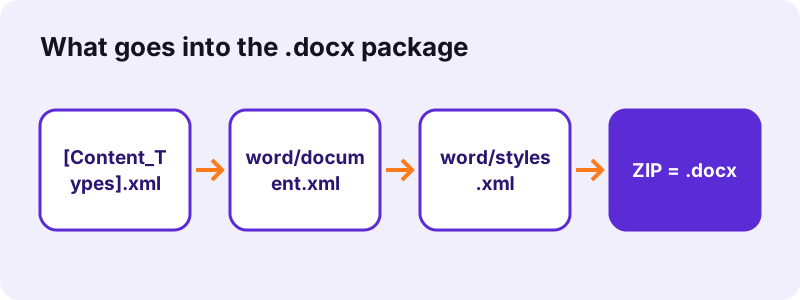
pdf24 PDF to DOCX creates an Office Open XML word-processing file: a ZIP archive holding XML parts for the text, the styles and the document properties. Word 2007 and later read this .docx format natively, and so do Google Docs, Apple Pages and LibreOffice, so one file works almost everywhere.
“Office Open XML is a zipped, XML-based file format developed by Microsoft for representing spreadsheets, charts, presentations and word processing documents.”
We opened the .docx made from our 6-page report as a ZIP. It holds 6 parts: [Content_Types].xml (721 bytes), _rels/.rels, docProps/core.xml, word/document.xml with all the text (16.2 KB uncompressed), word/styles.xml with Normal and Heading 1–3, and word/_rels/document.xml.rels. Converted scans add a word/media folder with one JPEG per page.
pdf24 PDF to DOCX package parts explained
| Part | What it holds | Size in our report file |
|---|---|---|
| [Content_Types].xml | List of part types | 721 B |
| word/document.xml | Paragraphs, runs, tables | 16.2 KB |
| word/styles.xml | Calibri 11 pt, Heading 1–3 | 1.5 KB |
| docProps/core.xml | Title and dates | 433 B |
| word/media/ | Page pictures (scans, Exact) | none for text |
pdf24 PDF to DOCX styles inside the file
The styles part defines Normal as Calibri 11 pt and three heading styles with outline levels, so Word's Navigation pane and automatic table of contents work on the converted file. Each run of text then keeps its own size, bold and italic from the PDF, written as direct formatting on top of Normal.
pdf24 PDF to DOCX page setup
The page size of the .docx copies the first PDF page: our A4 test files gave A4 sections of 595 × 842 points. Editable files get 0.75-inch (54 pt) margins on all sides; Exact files get no margin, so each page picture fills the sheet.
pdf24 PDF to DOCX tip: change the page size afterwards
Need US Letter instead of A4? In Word open Layout → Size and pick Letter; the rebuilt paragraphs reflow to the new width because they are real text, not pictures.
Why choose pdf24 PDF to DOCX instead of DOC, ODT or RTF?
pdf24 PDF to DOCX gives you the default Word format since Office 2007 and the one that every office suite and most online editors accept on upload. Compared with the old binary .doc it is smaller, open as a published standard (ECMA-376, ISO/IEC 29500) and easy to repair, because each part is plain XML inside a ZIP.
| Format | Opens in | When to pick it |
|---|---|---|
| DOCX | Word 2007+, Google Docs, Pages, LibreOffice | Default choice |
| DOC (97–2003) | All Word versions | Only for Word 2003 or older: save as .doc from Word |
| ODT | LibreOffice, OpenOffice, Word | PDF to ODT for open-format rules |
| RTF | WordPad, TextEdit, any editor | PDF to RTF for very old software |
This page and PDF to Word run the same converter; the Word page explains how the text is rebuilt, this one focuses on the .docx file you get.
Which apps open a file from pdf24 PDF to DOCX?
A .docx from pdf24 PDF to DOCX opens in Microsoft Word for Windows and Mac (2007 and later), Word on the web, the Word mobile apps, Google Docs, Apple Pages, LibreOffice Writer and OnlyOffice. We tested the files with python-docx as a strict reader: every paragraph, style and table was parsed without errors.
- Google Docs: upload the .docx to Drive and choose Open with → Google Docs; tables and headings carry over.
- Apple Pages: double-click the file on a Mac or open it from Files on an iPhone.
- LibreOffice Writer: opens it directly; save as ODT if you prefer, or use PDF to ODT from the start.
- Word 2003: needs Microsoft's old compatibility pack; easier to re-save as .doc in a newer Word.
Microsoft documents the format and its relation to older files in its MS-DOCX specification.
What we measured with pdf24 PDF to DOCX
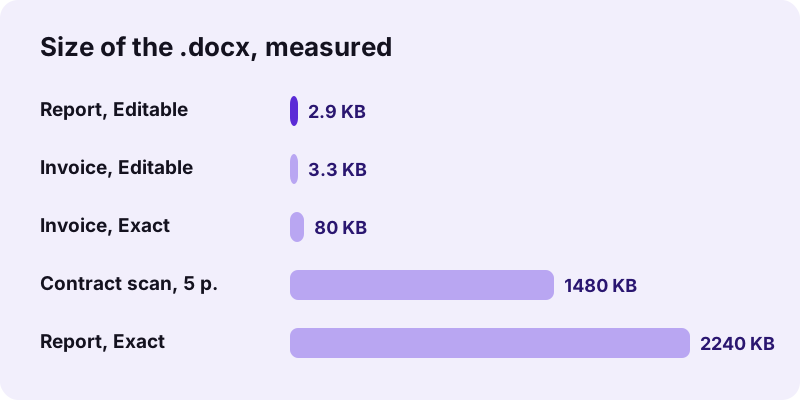
Our five test files show how the content of the PDF decides the size of the .docx. Text-only PDFs give files of a few kilobytes, because only XML text is stored; scans and Exact look store page pictures, so the .docx grows to megabytes. All runs sent 0 bytes to any server.
| Test PDF | Result type | .docx size | Time | Inside |
|---|---|---|---|---|
| Report, 6 pages, 5.1 KB | Editable | 2.9 KB | 1.0 s | 6 headings, 6 paragraphs |
| Invoice, 2 pages, 2.4 KB | Editable | 3.3 KB | 0.6 s | 1 table, 6 × 4 cells |
| Invoice, 2 pages | Exact | 80 KB | 1.8 s | 2 page JPEGs |
| Contract scan, 5 pages, 2.46 MB | Editable | 1.48 MB | 13.2 s | 5 page JPEGs |
| Photo page + text page, 9.96 MB | Editable | 40 KB | 17.3 s | text kept, photos dropped |
pdf24 PDF to DOCX with scans and photos
Scanned pages have no text layer, so pdf24 PDF to DOCX stores them in the .docx as pictures in word/media, one 150 dpi JPEG per page. Photos on pages that also carry text are not copied in Editable mode. Run OCR first for editable scans, and use Exact look when the pictures must stay.
On our mixed test file, page 1 (heading, sentence, two photos and a chart) came out as text only, while page 2 (6 characters of text) was treated as a scan and kept as one 48 KB picture. The result line under the button always says how many pages were placed as pictures. Add a text layer with OCR PDF, or save the photos separately with Extract images.
Is pdf24 PDF to DOCX private?
pdf24 PDF to DOCX is private because the PDF never leaves your phone or computer. The browser reads the file through the File API, JavaScript builds the ZIP package in memory, and the download is a local blob. We logged every network request during our tests: 0 uploads, in all runs.
That makes it suitable for HR files, contracts and medical letters. Close the tab and the data is gone from memory; nothing is kept on a server because nothing reached one. The File API on MDN describes how pages read local files.
Fixing a pdf24 PDF to DOCX file in Word
Most clean-up after pdf24 PDF to DOCX takes a few minutes. Columns, text boxes and original fonts are not rebuilt, so set the font for the whole document, re-create columns where you need them and turn aligned text into a table if it was not detected. Headings are already styled.
- Press Ctrl+A and choose one font for the whole document.
- Open View → Navigation pane to check that Heading 1–3 were detected.
- Select aligned lines and use Insert → Table → Convert Text to Table if needed.
- Delete repeated page headers and footers that came in as normal lines.
- Save as .docx again, or export a PDF with Word to PDF.
pdf24 PDF to DOCX: frequently asked questions
Is pdf24 PDF to DOCX free?
Yes, it is free with no account, no watermark and no limit on the number of files. The work happens on your device, so there is no server cost per conversion. Convert one PDF, download the .docx, then pick the next file; every result is a normal Word file that belongs to you.
Is pdf24 PDF to DOCX different from PDF to Word?
The converter is the same; the pages differ in focus. PDF to Word explains how text, headings and tables are rebuilt, while this page explains the .docx package itself: its parts, the apps that open it, sizes and compatibility. Both give exactly the same .docx file from the same PDF and settings.
Which Word versions open a pdf24 PDF to DOCX file?
Word 2007 and every later version on Windows, Word 2008 and later on Mac, Word on the web and the Word apps for iPhone, iPad and Android. Word 2003 and older cannot read .docx without Microsoft's old compatibility pack; open the file in a newer Word and save it as .doc instead.
Can Google Docs edit a pdf24 PDF to DOCX result?
Yes. Upload the .docx to Google Drive and open it with Google Docs, or convert it to a Google document. Paragraphs, bold, italic, headings and the rebuilt tables carry over. Google Docs does not need the original PDF fonts, because the file uses Calibri, which Docs substitutes with a similar font if missing.
Why is my pdf24 PDF to DOCX file so large?
A large .docx means it contains pictures: either the PDF was a scan, or you chose Exact look. Our 2-page invoice gave 3.3 KB as editable text but 80 KB in Exact look, and a 5-page scan gave 1.48 MB. Run OCR PDF on scans to get text instead of page pictures.
Does pdf24 PDF to DOCX keep tables?
Yes, when the table text is aligned in columns. Our invoice became a Word table of 6 rows and 4 columns with borders, written as a real w:tbl element in document.xml, so you can sort, resize and add rows. Tables with merged cells may come out as plain lines instead.
Can pdf24 PDF to DOCX convert a scanned PDF?
It converts it, but each scanned page becomes a picture in the .docx, because a scan holds no letters. The result line tells you how many pages had no text layer. Run OCR PDF first, then convert the OCR result to get editable paragraphs you can correct and reuse.
Does pdf24 PDF to DOCX upload my document?
No. The PDF is read by your browser and the .docx is assembled locally in JavaScript. In our tests the page made 0 upload requests, and the result line shows 0 bytes uploaded. You can confirm it in the Network tab of your browser's developer tools while you convert.
Is this pdf24 PDF to DOCX tool made by PDF24?
No. pdf24tools is an independent site, not affiliated with PDF24 or Geek Software GmbH. Our converter is our own code: it runs in your browser, uploads nothing and needs no account. We use plain, familiar page names so the tool is easy to find, but the website, the code and the team are separate.
Can I use pdf24 PDF to DOCX on a phone?
Yes. Open the page in Safari or Chrome on iPhone, iPad or Android, choose the PDF from Files or Downloads and tap Convert to Word. The .docx is saved to Downloads, where the Word app, Google Docs or Pages opens it. Large scans are slower on phones because they have less memory.
Can I turn a pdf24 PDF to DOCX file into DOC?
Yes, in Word: open the .docx, choose File → Save As and pick Word 97–2003 Document (.doc). LibreOffice can do the same with Save As → Word 97–2003. Keep the .docx as your working copy, because the old .doc format stores tables and styles less reliably.
Does pdf24 PDF to DOCX keep the original fonts?
No. Embedded PDF fonts are often subsets that only contain the letters used, so they cannot be reused for editing. The .docx uses Calibri at the sizes found in the PDF, with bold and italic kept. Select all text in Word and pick the font you want in one step.
More pdf24 PDF to DOCX tools and guides
pdf24 PDF to DOCX: sources
- Office Open XML — Wikipedia
- [MS-DOCX]: Word Extensions to the Office Open XML File Format — Microsoft Learn
- File API — MDN Web Docs