How to use pdf24 create a job application as pdf in 5 steps
- Add your documents. Choose or drop the cover letter, CV and certificates: Word .docx, PDF and pictures such as JPG, PNG or HEIC photos of paper documents.
- Put them in order. Use the arrow buttons in the file list. The usual order is letter, CV, then certificates from newest to oldest.
- Fill in the cover page. Keep Add a cover page ticked and type your name, the position you apply for, your email and phone. Untick it if the employer does not want one.
- Build the PDF. Press Build application PDF. Word files are converted, pictures are placed on A4 pages and PDF pages are copied as they are.
- Download and check. The file is named after you, for example Jane-Doe-application.pdf. Open it and check every page before you send it.
What goes into pdf24 create a job application as pdf?
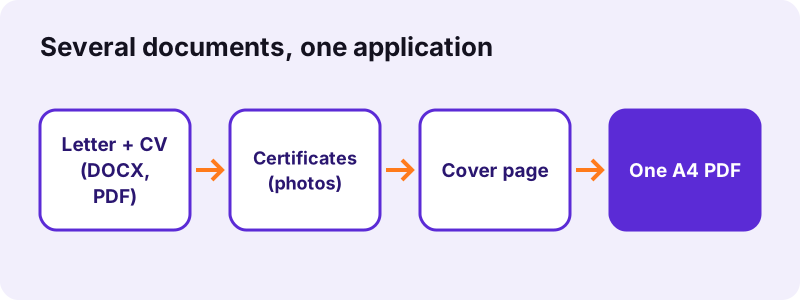
The application PDF contains, in this order, an optional cover page and then every document you added, in the order of the file list. A Word document becomes its converted pages, a PDF keeps all its pages, and each picture becomes one A4 page with the image centred and a 30-point margin.
| File type | What happens | Text selectable? |
|---|---|---|
| all pages copied unchanged | as in the original | |
| Word .docx | converted to A4 pages first | Yes |
| JPG, PNG, WebP, GIF, BMP | one A4 page per picture | No (it is an image) |
| HEIC (iPhone photo) | decoded, then one A4 page | No |
| TIFF with several pages | one A4 page per TIFF page | No |
| Old .doc, .odt, .pages | not accepted: save as .docx or PDF first | – |
The cover page of pdf24 create a job application as pdf
The cover page has a coloured band with the word Application, your name in large type, the line Application for the position of … and your email and phone. Below that comes a Contents list built from the file names: CV_Jane-Doe.pdf is listed as CV Jane Doe, because underscores and hyphens become spaces.
File names for pdf24 create a job application as pdf
Because the contents list uses the file names, rename the files before you add them: 1-Cover-letter.docx, 2-CV.pdf, 3-Master-degree.jpg read much better than scan0042.jpg. Our test files report, photo0 and text-6p showed up exactly like that on the cover.
Pictures of certificates in pdf24 create a job application as pdf
A phone photo is enlarged at most 1.5 times and shrunk to fit inside the A4 page, so it is never cut off. For a cleaner look, crop the photo to the paper edge first, or scan the certificate with the scan PDF tool, which whitens the paper and sharpens the contrast of the text.
pdf24 create a job application as pdf: a tip on order
Recruiters read the first two pages most carefully. Put the cover letter right after the cover page and the CV second; reference letters and diplomas follow, newest first.
How big is a file from pdf24 create a job application as pdf?
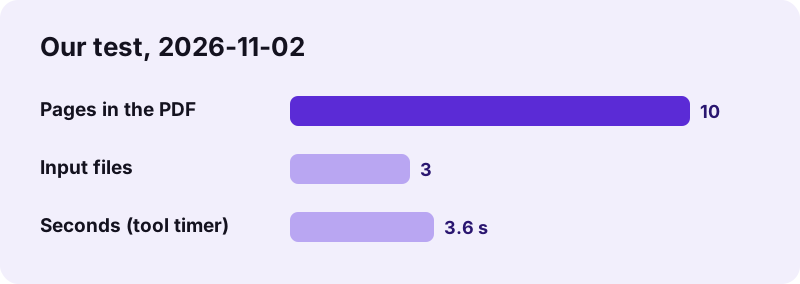
The finished application file is about as big as all the files you added, because PDF pages and photos are copied without recompression. In our test a Word report, a 3.6 MB phone photo and a 6-page PDF, together 5.62 MB, became a 10-page PDF of 5.66 MB. Portals often accept 2 to 10 MB.
If the portal or the recruiter's mailbox has a lower limit, run the finished file through compress PDF and pick an exact size such as 2 MB. Compressing redraws pages as images, so do it once at the end, not on every document.
| Input | Size | Pages in the PDF |
|---|---|---|
| Cover page | – | 1 |
| report.docx | 2.11 MB | 2 |
| photo0.jpg | 3.78 MB | 1 |
| text-6p.pdf | 5 KB | 6 |
| Total | 5.62 MB in | 10 pages, 5.66 MB out |
Is pdf24 create a job application as pdf private?
Yes. Job applications hold your address, phone number, date of birth and certificates, and none of it leaves your device here: the documents are read and joined by JavaScript in your browser, and the result line reports 0 bytes uploaded. Nothing is stored, so closing the tab removes every file from the page.
With pdf24 create a job application as pdf, Word files are converted in the same tab with a JavaScript library, not by a server-side Office. You can even switch off the internet after the page has loaded and build the file offline. The PDF's document title is set to Application – your name, which some portals show instead of the file name.
What pdf24 create a job application as pdf does not change
The tool joins documents; it does not write or edit them. It does not check spelling, change fonts, add page numbers or sign anything. Pages copied from a PDF keep their own size, so a Letter-size CV stays Letter inside an otherwise A4 file.
- Need page numbers across the whole file? Run add page numbers on the result.
- Need to remove a page? Use remove PDF pages.
- Need your signature on the letter? Use sign PDF before or after joining.
- Your CV is a Word file with special fonts? Check those pages: the converter covers text, tables and pictures, but rare layouts can shift.
pdf24 create a job application as pdf: why one file wins
A single PDF opens the same way on every computer and phone, keeps your layout, and can be forwarded inside the company as one attachment instead of five. Many applicant tracking systems also allow only one upload field. pdf24 create a job application as pdf gives you that one file without a desktop program, and our other tools fix the details afterwards.
“…a letter of introduction attached to or accompanying another document such as a résumé or a curriculum vitae.”
pdf24 create a job application as PDF: frequently asked questions
Is pdf24 create a job application as pdf free?
Yes. Building the application file costs nothing, needs no account and adds no watermark, so recruiters see only your documents. You can rebuild the file as often as you like, for example for every company with a different cover page. The work runs in your browser, so there is no daily limit.
Which files can pdf24 create a job application as pdf combine?
PDF, Word .docx and pictures: JPG, PNG, WebP, GIF, BMP, SVG, TIFF and iPhone HEIC photos. Older formats such as .doc, .odt or Apple Pages are not accepted in this tool; save them as .docx or PDF first, or convert them with our Word to PDF tool.
Can pdf24 create a job application as pdf skip the cover page?
Yes. Untick Add a cover page and the PDF starts directly with your first document. That is useful when the employer asks for the letter as the first page, or when your own CV design already has a title page. All other files are joined in the same way.
Does pdf24 create a job application as pdf upload my CV?
No. All documents are read and combined inside your browser tab, and the result line shows 0 bytes uploaded. Personal data such as your address, date of birth and certificates never reaches a server. Nothing is kept after you close the tab, so there is nothing to delete.
How do I change the order in pdf24 create a job application as pdf?
Use the arrow buttons next to each file in the list; the PDF follows that order from top to bottom, after the cover page. If you add files one at a time, add them in the right order and you will not need to move anything. Check the order on the cover's contents list.
Can pdf24 create a job application as pdf make the file smaller?
Not by itself: pages and photos are copied without recompression, so 5.62 MB of input became 5.66 MB in our test. If the portal allows less, compress the finished application once with compress PDF and an exact target such as 2 MB, then check that the scans are still readable.
Will Word formatting survive pdf24 create a job application as pdf?
Mostly. Text, headings, tables and pictures of a .docx are converted to A4 pages in the browser. Rare fonts, text boxes or complex CV templates can shift a little. For a pixel-perfect result, export the CV to PDF from Word itself and add that PDF instead.
Does pdf24 create a job application as pdf work on a phone?
Yes. On Android and iPhone you can pick documents from Files, Google Drive or iCloud and photos straight from the gallery, including HEIC. The finished PDF can be attached to an email or uploaded to the job portal from the phone. Large photo sets take a few seconds longer.
Can pdf24 create a job application as pdf add page numbers?
Not in the same step. The tool joins the documents and adds the cover page. Run the result through add page numbers if you want numbering across the whole application; it lets you skip the cover so the letter starts at page 1.
What file name does pdf24 create a job application as pdf use?
Your name from the cover form followed by -application.pdf, for example Jane-Doe-application.pdf; without a name it is application.pdf. The PDF title in the document properties is Application – your name. Rename the file if the employer asks for a format such as Surname_Firstname_Position.pdf.
Can pdf24 create a job application as pdf open a password-protected PDF?
No. A certificate PDF protected with an open password cannot be copied into the application. Remove the protection first with unlock PDF, using the password you were given, and then add the unlocked file. PDFs with only editing restrictions usually work.
Is pdf24 create a job application as pdf from PDF24?
No. pdf24tools is an independent website and is not affiliated with PDF24 or Geek Software GmbH. We built this application tool ourselves; it runs completely in your browser, and the sizes and timings on this page come from our own test on 2026-11-02.
pdf24 create a job application as PDF: sources
- Cover letter — Wikipedia
- Curriculum vitae — Wikipedia
- Europass CV — European Union