How to use pdf24 create pdf invoice visually in 4 steps
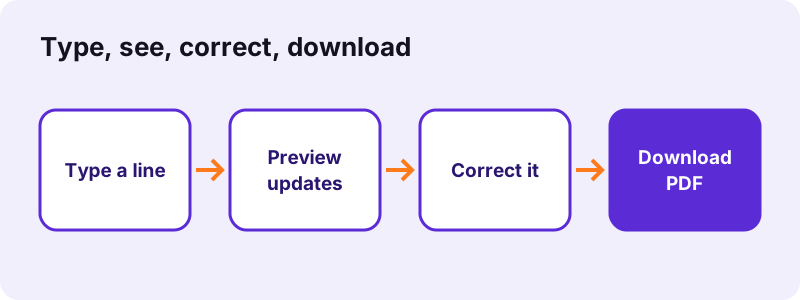
- Fill in From and Bill to. Type your details and the customer's. The preview shows both blocks side by side as soon as you type.
- Type the item lines. One line per item: description; quantity; unit price. A new row appears in the preview table with its amount for every line you finish.
- Check the totals in the preview. Change the tax rate or a price and watch Subtotal, Tax and Total recalculate. Fix any line that looks wrong.
- Create and download the PDF. Press the button. The PDF uses exactly the figures shown in the preview and downloads as invoice-<number>.pdf.
What does pdf24 create pdf invoice visually show while you type?
The pdf24 create pdf invoice visually page draws a small invoice sheet beside the form: title and number, date and due date, seller and customer, then a table with one row per item and the subtotal, tax and total rows. The sheet redraws after every key press, so the numbers are never out of date.
In our test we typed three lines, 10 × 50, 12 × 9.99 and 1 × 120. The preview listed Website design 500.00 EUR, Hosting (12 months) 119.88 EUR and Logo files 120.00 EUR, then Subtotal 739.88 EUR, Tax 20% 147.98 EUR and Total 887.86 EUR. The PDF made from it showed the same six figures.
Typing errors pdf24 create pdf invoice visually catches
- A missing semicolon: the line shows quantity 1 and price 0.00 instead of your price.
- A wrong decimal: 9,99 and 9.99 both become 9.99, but 999 stays 999.00 and stands out at once.
- A forgotten tax rate: the Tax row disappears when the rate is 0 or empty.
- A line typed twice: two identical rows are easy to spot in the table.
Decimal commas in pdf24 create pdf invoice visually
Prices in the European style are understood. We typed Beratung; 2; 1.234,50 and Reise; 1; 89,90; the preview and the PDF both showed 2,469.00 and 89.90, a subtotal of 2,558.90 and a total of 3,070.68 at 20 % tax.
Preview limits of pdf24 create pdf invoice visually
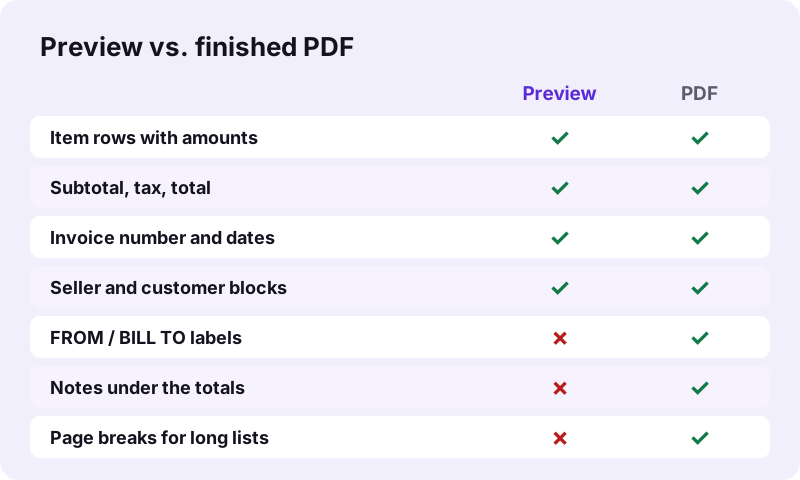
The preview is a quick check of content, not a page image. It leaves out the FROM and BILL TO labels and your notes, and it does not show where a long item list breaks onto page 2. The PDF adds all of these.
pdf24 create pdf invoice visually: a tip for the last check
Before you press the button, read the Total row aloud against the amount you agreed with the customer. It is the one figure people check first, and the preview puts it in bold at the bottom.
Why use pdf24 create pdf invoice visually instead of the plain form?
The pdf24 create pdf invoice visually page has the same fields and makes the same PDF as the plain invoice form; the difference is feedback. You see each amount as soon as the line is typed, which helps with long item lists, discounts, mixed decimal styles and invoices you write on a small phone screen.
| Invoice maker (this page) | Create invoice form | |
|---|---|---|
| Fields | same 9 fields | same 9 fields |
| Live table and totals | Yes | No |
| PDF for 3 lines | 17,531 bytes, 1 page | 17,532 bytes, 1 page |
| Time to PDF | 0.4 s | 0.9 s |
| Uploads | 0 bytes | 0 bytes |
Both times are from the tool's own timer on a Windows laptop; a phone takes a little longer. If you only send one or two simple invoices a month, the plain create invoice form is enough.
Is your data private with pdf24 create pdf invoice visually?
pdf24 create pdf invoice visually keeps your data private: the preview and the PDF are both drawn by JavaScript inside your browser tab; no form text, price or bank detail is sent to a server, and the result line confirms 0 bytes uploaded. Nothing is stored either, so a reload clears the form and the preview.
That also means there is no saved history. Download each PDF and keep it with your records; make the next invoice with a new number, because the suggested INV-YYYYMM-001 does not count up by itself.
“WYSIWYG implies a user interface that allows the user to view something very similar to the result while the document is being created.”
The finished file from pdf24 create pdf invoice visually
The download from pdf24 create pdf invoice visually is an A4 page (595 × 842 points) with real, searchable text in an embedded Unicode font: names with accents, umlauts or the euro sign print correctly. Long lists continue on further pages with the table header repeated. The document title in the PDF properties is Invoice plus your number.
- Top: Invoice, number, date, due date.
- Middle: FROM and BILL TO blocks, first line in bold.
- Table: Description, Qty, Unit price, Amount.
- Bottom: Subtotal, Tax (if the rate is not 0), Total in bold, then your notes.
What is not included: a logo, a signature, a QR payment code or XML data. For an XML e-invoice you received, the XML invoice to PDF tool prints a readable copy; to sign the finished PDF, use sign PDF.
pdf24 create pdf invoice visually on phones and computers
On a wide screen the form and the preview sit side by side; on a phone the preview follows below the form, so scroll down after typing a line to check it. The page works in current Chrome, Edge, Firefox and Safari on Windows, macOS, Linux, Android and iOS, and keeps working offline once loaded.
pdf24 create PDF invoice visually: frequently asked questions
Is pdf24 create pdf invoice visually free?
Yes. There is no price, no account, no watermark and no limit on the number of invoices. Your browser does the work, so we have no per-invoice cost to recover. You do not need to give an email address or install anything; the page works in any current browser.
Does pdf24 create pdf invoice visually upload my invoice?
No. The preview and the PDF are made inside your browser tab. The result line shows 0 bytes uploaded, and in our network check the only outside requests were the site's web fonts. Your customers' names, prices and bank details never reach a server.
Is the preview in pdf24 create pdf invoice visually the same as the PDF?
The figures are the same: rows, amounts, subtotal, tax and total come from one calculation. The layout is simplified, though. The preview leaves out the FROM and BILL TO labels, the notes and page breaks, which only appear in the PDF. Open the download once to check it.
How do I enter items in pdf24 create pdf invoice visually?
Write one item per line as description; quantity; unit price, for example Logo files; 1; 120. You can also paste three columns from a spreadsheet, because a tab works as separator too. Each finished line appears as a row in the preview with its amount.
Can pdf24 create pdf invoice visually calculate VAT?
Yes, one rate for the whole invoice. Type the percentage and the preview adds a Tax row and a new total at once. Set 0 to remove the tax row. Invoices with two VAT rates need two invoices or a manual note, because the tool does not tax lines separately.
Can I add a logo in pdf24 create pdf invoice visually?
No. The invoice is text only. You can print it on paper that already carries your letterhead, or place a logo picture on the finished file with a PDF editor. The text layout keeps a free band at the top where a pre-printed logo usually sits.
Does pdf24 create pdf invoice visually work on an iPhone?
Yes, in Safari and in any other iPhone browser. The preview appears below the form, so scroll down after each line. The semicolon is on the 123 keyboard. When you press the button, iOS offers to open or share the PDF, for example in Mail or Files.
Can pdf24 create pdf invoice visually save my customers?
No. Nothing is stored, not even in browser storage, so a reload empties every field. Keep a note with your usual From block and item lines and paste them in. The fields do keep their text while the tab stays open, which makes a series of invoices quick.
Which number formats does pdf24 create pdf invoice visually accept?
Both decimal styles. 1.234,50 and 12,50 are read as European numbers, 1,234.50 as English, and plain 1234.5 works too. The PDF prints amounts in the format of the page language, which on this English page means a comma for thousands and a point for decimals.
Does pdf24 create pdf invoice visually make an e-invoice?
No. The result is a PDF for people, not a structured XML e-invoice such as XRechnung or Factur-X. Those formats have to pass official validation that we cannot run in a browser, so we do not pretend to produce them. Check whether your customer accepts PDF invoices.
What happens with long invoices in pdf24 create pdf invoice visually?
The preview simply grows longer; the PDF moves to a new A4 page whenever the table reaches the bottom margin and repeats the column header. In our plain-form test, 60 item lines filled 2 pages and the file was 22,986 bytes, far below any email limit.
Is pdf24 create pdf invoice visually a PDF24 product?
No. pdf24tools is an independent site, not affiliated with PDF24 or Geek Software GmbH. We built this invoice maker ourselves; it runs completely in your browser, and every figure on this page comes from our own test on 2 November 2026.
More pdf24 create PDF invoice visually tools and guides
pdf24 create PDF invoice visually: sources
- WYSIWYG — Wikipedia
- Invoicing rules (VAT) — Your Europe, European Union
- Invoice — Wikipedia