How to use pdf24 generate qr code in 4 steps
- Enter the link or text. Paste a web address, a phone number, a Wi-Fi string or any text into Link or text.
- Pick size and error correction. 1024 px and level M are the defaults. Choose H for codes that will be printed small, worn or partly covered.
- Set the colours. Type a dark colour for the modules and a light one for the background as hex codes, for example #1f2a6b on #f6efe0.
- Make and download. Press Make QR code. A preview appears and the ZIP holds qr-code.png and qr-code.svg. Scan the preview with your phone before you print.
What does pdf24 generate qr code give you?
The pdf24 generate qr code tool gives you one ZIP with two files of the same code: qr-code.png, a pixel image in the size you chose, and qr-code.svg, a vector file that stays sharp at any print size. Both include the white quiet zone of 4 modules around the code that scanners need.
| Content | Size, level | Grid | PNG | SVG |
|---|---|---|---|---|
| https://pdf24tools.org/ (23 characters) | 1024 px, M | 25 × 25 | 26,266 bytes | 4,683 bytes |
| https://pdf24tools.org/generate-qr-code/ (40) | 2048 px, H | 37 × 37 | 92,708 bytes | 9,627 bytes |
| same link | 256 px, L | 29 × 29 | 3,741 bytes | 6,411 bytes |
| Wi-Fi login (41 characters) | 1024 px, Q | – | 26,928 bytes | 7,646 bytes |
We decoded the 512-pixel H code, the Wi-Fi code and a navy-on-cream version with OpenCV 4.12, and each returned exactly the text we had typed. The default ZIP was 31,167 bytes and appeared in 0.1 seconds.
PNG or SVG from pdf24 generate qr code?
Use the PNG for screens, slides, emails and websites; 1024 px is plenty for a full-screen display. Use the SVG for print: flyers, posters, business cards, packaging and signs, because a vector file scales to any size without blur. Word, PowerPoint, Canva, Illustrator and Inkscape all accept SVG.
pdf24 generate qr code: the version line
After making a code, the result line prints its QR version, the standard size class from 1 to 40. Version 1 is a 21 × 21 grid and each version adds 4 modules per side, so our 46-character test link with umlauts came out as version 4, a 33 × 33 grid. Longer text needs a higher version; the largest, version 40, has 177 × 177 modules.
pdf24 generate qr code and print size
A common rule of thumb is a printed code at least 2 × 2 cm for scanning from a hand's length, and larger for posters seen from a distance: about one tenth of the scanning distance. Short links give coarser grids that scan from further away.
pdf24 generate qr code: test before printing
Scan the on-screen preview with two different phones, then print one test copy at the final size and scan that too. It takes a minute and saves a box of reprinted flyers.
How much text fits in a code from pdf24 generate qr code?
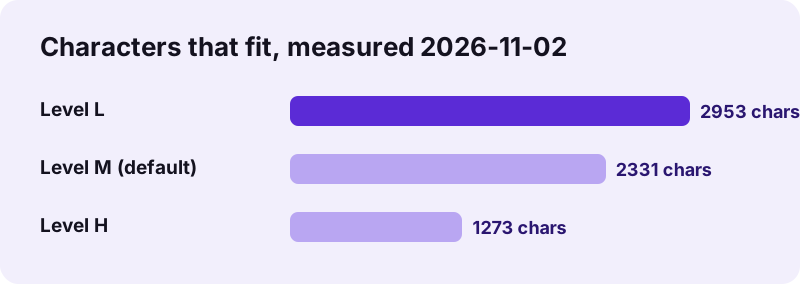
The text that fits in a code from pdf24 generate qr code depends on the error correction level. In our test plain ASCII text fitted up to 2,953 characters at level L, 2,331 at M and 1,273 at H; one character more gave the message This text is too long for a QR code.
pdf24 generate qr code stores text as UTF-8 bytes: an English letter takes 1 byte, an accented letter 2 and most emoji 4, so a French or Arabic text fits fewer characters than these limits. Long texts also make dense codes that cheap phone cameras struggle with. For anything longer than a few hundred characters, put the text on a web page and encode the link instead.
Error correction levels in pdf24 generate qr code
| Level | Damage it can recover | Use |
|---|---|---|
| L | about 7 % | screens, clean prints, longest text |
| M (default) | about 15 % | most prints |
| Q | about 25 % | outdoor, rough surfaces |
| H | about 30 % | small prints, a logo placed on top |
Is pdf24 generate qr code private, and does the code expire?
The QR code from pdf24 generate qr code is made in your browser and contains your text directly, so nothing is sent to a server and the code cannot expire. There is no redirect link in between: when someone scans it, their phone reads your link or text itself, and no one counts or tracks the scans.
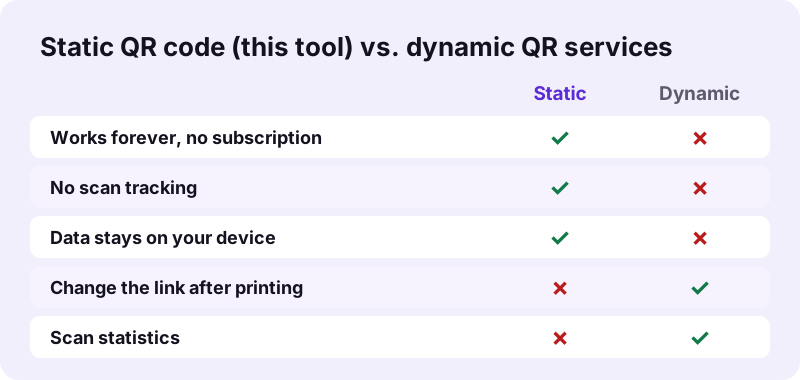
Many online QR services make dynamic codes: the printed code points to their short link, which forwards to yours. That allows statistics and later changes, but the code stops working if the subscription ends. A static code is the safer choice for anything printed for years, such as a menu, a sign or a book.
“…a type of two-dimensional matrix barcode invented in 1994 by Masahiro Hara of the Japanese company Denso Wave for labelling automobile parts.”
pdf24 generate qr code for links, Wi-Fi, contacts and more
Any text works in pdf24 generate qr code, and phones recognise a few standard formats and offer an action. Our Wi-Fi test string decoded exactly, so a guest can join the network without typing the key.
| Purpose | Type this into Link or text |
|---|---|
| Web page | https://example.com/menu |
| Wi-Fi login | WIFI:T:WPA;S:NetworkName;P:password;; |
| Phone call | tel:+441234567890 |
| mailto:info@example.com | |
| Text message | SMSTO:+441234567890:Hello |
| Map location | geo:51.5007,-0.1246 |
To put a code into a PDF, such as an invoice or a flyer, save the PNG and place it with edit PDF. A strong Wi-Fi key for the code can come from our password generator.
pdf24 generate qr code with colours
Type any hex colour for the modules and the background; invalid values fall back to black on white. Keep the modules dark and the background light with strong contrast: most scanners expect dark on light, and inverted or pale codes fail on many phones. Our navy #1f2a6b on cream #f6efe0 decoded without trouble.
pdf24 generate QR code: frequently asked questions
Is pdf24 generate qr code free?
Yes. Making QR codes costs nothing, needs no account and adds no watermark or logo. You can make as many codes as you like, at every size, and use them commercially on flyers, packaging or menus. The codes are static, so there is also no subscription to keep them working.
Do codes from pdf24 generate qr code expire?
No. The code contains your link or text itself, not a redirect through our server, so it keeps working for as long as the printed code is readable and the link you encoded exists. There is nothing to renew and nothing we could switch off.
Does pdf24 generate qr code track scans?
No. Because the code holds your text directly, a scan goes straight from the phone to your link and never passes through us. We cannot count scans and do not try to. If you need statistics, add a tracking parameter to your own link, such as ?src=flyer.
Does pdf24 generate qr code upload what I type?
No. The code is calculated and drawn in your browser tab; the result line shows 0 bytes uploaded. That matters for Wi-Fi passwords, private links or contact details you encode. Nothing is stored after you close the page, so each code exists only in the files you downloaded.
What sizes does pdf24 generate qr code offer?
The PNG comes in 256, 512, 1024 or 2048 pixels square; 1024 is the default. The SVG in the same ZIP is a vector file, so it can be printed at any size, from a 2 cm sticker to a poster, without becoming blurred.
How much text can pdf24 generate qr code hold?
In our test up to 2,953 plain characters at level L, 2,331 at M and 1,273 at H. Accented letters and emoji use more bytes, so fewer of them fit. For long text, publish it on a web page and encode the short link, which also scans more easily.
Which error correction should I pick in pdf24 generate qr code?
M, the default, suits most prints and screens. Pick L when you need the most text and the code stays clean, Q for outdoor signs and rough surfaces, and H when the code is printed very small or you want to place a small logo over its centre afterwards.
Can pdf24 generate qr code make a Wi-Fi QR code?
Yes. Type WIFI:T:WPA;S:YourNetwork;P:YourPassword;; into the text field, replacing the network name and password. Phone cameras on Android and iPhone then offer to join the network. Our 41-character Wi-Fi test code decoded to exactly the text we entered.
Can I change the colours in pdf24 generate qr code?
Yes, with hex codes for the modules and the background, for example #1f2a6b on #f6efe0. Keep strong contrast and dark modules on a light background; inverted or pale codes do not scan on many phones. Scan the preview before printing to be sure.
Can pdf24 generate qr code add a logo in the middle?
No, the code is plain. You can choose level H, which tolerates about 30 % damage, and then place a small logo over the centre in a design program using the SVG. Keep the logo small, away from the three corner squares, and test the result with several phones.
Why does pdf24 generate qr code download a ZIP?
Because you get two files, the PNG and the SVG, and the site packs several results into one download. Unzip it with a double-click on Windows or macOS, or tap it in the Files app on a phone. Use whichever of the two files your program accepts.
Is pdf24 generate qr code made by PDF24?
No. pdf24tools is an independent website and is not affiliated with PDF24 or Geek Software GmbH. We built this generator ourselves on an open-source QR library; it runs in your browser, and the sizes and limits on this page come from our test on 2026-11-02.