How to use pdf24 bookmark PDF in 4 steps
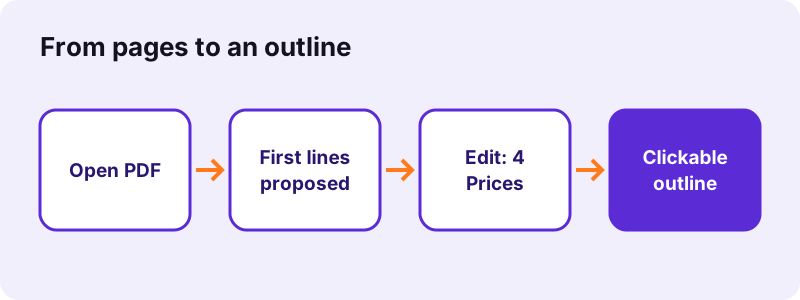
- Choose the PDF. Tap Choose a PDF or drop the file on the box. The tool reads the first line of text on each page.
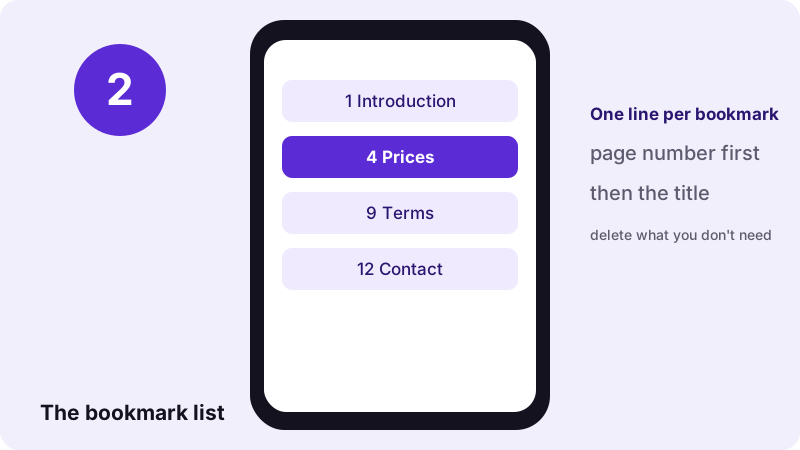
- Edit the list. The box shows one line per page, such as 1 Introduction. Delete lines you do not need, change titles, or type new lines: page number, a space, the title.
- Press Add bookmarks. Keep Show the bookmarks panel when the PDF opens ticked if readers should see the outline at once.
- Download the file. Save the file ending in -bookmarked.pdf and open it: the outline appears in the reader's side panel.
What does pdf24 bookmark PDF add to a file?
pdf24 bookmark PDF writes an outline into the PDF: a list of titles, each linked to a page. Readers such as Adobe Acrobat Reader, browser viewers, Preview on Mac and most phone apps show it in a side panel, where one click jumps to that page. The page content itself is not changed at all.
On our 6-page test file the tool proposed six lines, from 1 Test document page 1 to 6 Test document page 6, and wrote six bookmarks in 0.1 seconds; the file went from 5,238 to 4,406 bytes because it was saved in a more compact form. A 3-page file got three bookmarks in 0.2 seconds.
“TOCs in digital books and documents can be created using bookmarks.”
Writing the list in pdf24 bookmark PDF
Each line is one bookmark: the page number, then a separator, then the title. A space, a dot, a colon, a dash or a closing bracket all work as separators, so 4 Prices, 4. Prices, 4: Prices and 4) Prices give the same entry. Lines without a valid page number are skipped.
Proposed titles in pdf24 bookmark PDF
The proposal takes the first line of text of every page, cut to 80 characters, for up to 300 pages. In a report that is usually the heading, so most lines only need deleting or a small fix. Scanned pages have no text and are proposed as Page 1, Page 2 and so on.
pdf24 bookmark PDF in any language
Titles are stored as Unicode, so Arabic, Chinese, Cyrillic, Greek or accented titles show correctly in readers. Type them in the box as you would in any text field.
pdf24 bookmark PDF: tip for long manuals
Write the list in a text editor first, one chapter per line, and paste it into the box. A table of contents page in the document is a good source: copy its page numbers and titles straight over.
Why use pdf24 bookmark PDF on long files?
Bookmarks turn a long PDF into something people can navigate. Instead of scrolling through 80 pages to find the price list, a reader clicks Prices in the side panel. Bookmarks also help screen-reader users, make manuals and theses easier to review, and replace an outline that a merge or a split removed.
- Manuals and handbooks: one bookmark per chapter.
- Merged files: one bookmark per original document, for example 1 Contract, 7 Annex A, 12 Annex B.
- Theses and reports: chapters and appendices.
- Board packs and tenders: one entry per agenda item or lot.
- Scanned books: one entry per chapter, typed by hand.
Merging, splitting and reordering pages leave the old outline behind, because it belongs to the whole document. Run Merge PDF, Split PDF or Rearrange PDF pages first, then add the bookmarks to the final file.
What can pdf24 bookmark PDF not do?
pdf24 bookmark PDF writes a flat list: every bookmark sits on the same level, without nested chapters and sub-chapters. Each entry jumps to the top of its page, not to a spot in the middle. Adding bookmarks replaces any outline the file already had, so include the old entries in your list if you want to keep them.
| Feature | Supported |
|---|---|
| Bookmark to a page | Yes, top of the page |
| Titles in any language | Yes (Unicode) |
| Open with the bookmarks panel shown | Yes, option ticked by default |
| Nested levels (chapter > section) | No, one level |
| Keep an existing outline | No, the new list replaces it |
| Bookmarks to a web address | No |
Readers decide the side panel at opening from a setting in the file; this tool sets it to show the outline when the option is ticked. To change that setting alone, use Set PDF viewer preferences.
Is pdf24 bookmark PDF private?
pdf24 bookmark PDF keeps the document on your device. The browser reads the file, extracts the first lines of the pages for the proposal, and writes the outline in the open tab. No server receives the PDF or the list of titles, there is no account, and the result line confirms 0 bytes uploaded.
Because the page content is not touched, text stays selectable, scans keep their quality and form fields keep working. A certificate signature does not survive, as any change to a signed file breaks it; sign after adding bookmarks.
pdf24 bookmark PDF on phone and computer
pdf24 bookmark PDF works in Chrome, Edge, Firefox and Safari on Windows, Mac and Linux, and in Safari, Chrome or Samsung Internet on iPhone and Android, without an app. Editing the list is easiest on a computer keyboard; on a phone, deleting unwanted lines and fixing a few titles works fine too.
Check the result in a reader that shows outlines: in Chrome's viewer open the menu at the top left, in Preview choose View, Table of Contents, and in Adobe Acrobat Reader open the Bookmarks panel. Other tools that change a whole document's navigation include Add page numbers and Change PDF document info.
pdf24 bookmark PDF: frequently asked questions
Is pdf24 bookmark PDF free?
Yes. pdf24 bookmark PDF is free, with no account, no watermark and no page limit beyond your device's memory. The outline is written by your own phone or computer, so nothing costs us server time. You can add bookmarks to the same file again with a different list whenever you need.
How do I write a line in pdf24 bookmark PDF?
Type the page number, a separator and the title, one bookmark per line, for example 4 Prices or 4: Prices. A space, dot, colon, dash or closing bracket all work as the separator. Lines without a page number, or with a number beyond the last page, are skipped without an error.
Does pdf24 bookmark PDF upload my file?
No. The PDF is opened by your browser, the proposed titles are read on your device, and the outline is written in the same tab. Nothing is sent to a server, as the result line confirms with 0 bytes uploaded. The tool keeps working offline once the page has loaded.
Where does pdf24 bookmark PDF get the proposed titles?
From the first line of text on each page, up to 300 pages and 80 characters per title. In most reports that is the page heading. Scanned pages have no text layer, so they are proposed as Page 1, Page 2 and so on; run OCR PDF first if you want real titles from a scan.
Can pdf24 bookmark PDF make nested bookmarks?
No. Every bookmark is on the same level, which suits most documents up to a few dozen chapters. If you need sub-levels, give the titles a clear numbering instead, such as 2 Methods and 2.1 Samples, so the flat list still shows the structure at a glance.
Will pdf24 bookmark PDF delete my existing bookmarks?
Yes, the new list replaces any outline already in the file. If the document has bookmarks you want to keep, open it in a reader, copy their titles and pages into the list, and add your new entries. Then all of them are written together in the order of your lines.
Does pdf24 bookmark PDF change the pages?
No. Only the outline and, if ticked, the opening view are added; text, pictures, links and form fields stay exactly as they were. Our 6-page file even became slightly smaller, from 5,238 to 4,406 bytes, because it was saved in a more compact form.
Why can't I see the bookmarks from pdf24 bookmark PDF?
Some readers hide the side panel. Keep Show the bookmarks panel when the PDF opens ticked, or open the panel yourself: the outline icon in Chrome's viewer, View, Table of Contents in Preview, or the Bookmarks panel in Adobe Acrobat Reader. Simple phone viewers may not show outlines at all.
In which order does pdf24 bookmark PDF list entries?
In the order of your lines, not sorted by page. Usually you will write them from the first page to the last, but you can put an entry such as 30 Contact at the top if readers should find it first. Each entry still jumps to its own page.
Can pdf24 bookmark PDF work on a scanned book?
Yes. The outline does not need a text layer; only the proposal does. Type the chapter lines by hand, for example 1 Cover, 5 Chapter one, 23 Chapter two, using the page numbers of the PDF, which may differ from the numbers printed in the book.
Is this the official pdf24 bookmark PDF tool?
No. pdf24tools is an independent website and is not affiliated with PDF24 or Geek Software GmbH. This bookmark tool is our own code that runs in your browser. We use the name only because people search for it; your files are processed on your device, never on our servers.
pdf24 bookmark PDF: sources
- Table of contents — Wikipedia
- PDF — Wikipedia
- File API — MDN Web Docs