How to use pdf24 make PDF fillable in 4 steps
- Open the form. Choose a PDF exported from Word, Google Docs or another program, with blank lines such as Name: ________.
- Review the detected fields. Each blank line gets a purple frame and appears in the list with a name taken from its label.
- Adjust. Rename fields, remove extras with ×, or click on the page to add text boxes and checkboxes by hand.
- Save the fillable PDF. Press Save fillable PDF and download the -fillable.pdf file.
How does pdf24 make PDF fillable find the blanks?
pdf24 make PDF fillable reads the text layer of each page and looks for three patterns: three or more underscores, six or more dots, or three or more ellipsis characters. Each match becomes a text field with the same position and width, and a height of about 1.3 times the line's font size, never less than 14 pt.
| Pattern in the form | Detected? | Example |
|---|---|---|
| 3 or more underscores | Yes | Name: ________ |
| 6 or more dots | Yes | City: ........... |
| 3 or more … characters | Yes | Date: ……… |
| Drawn lines (vector graphics) | No | A ruled line without characters |
| Empty table cells or boxes | No | A rectangle around nothing |
| Lines in a scanned page | No | Any blank on a scan |
pdf24 make PDF fillable on our test form
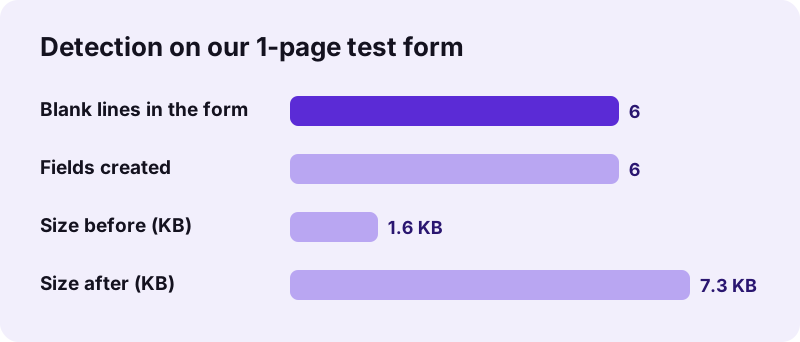
To test pdf24 make PDF fillable we used a 1-page PDF of 1.6 KB with 6 blank lines: Full name, Email, Phone, Date of birth, Signature and Date. All 6 were found, and the fields were named Full_name_1, Email_2, Phone_3, Date_of_birth_4, Signature_5 and Date_6. Saving took 0.2 seconds and the fillable file was 7.3 KB.
pdf24 make PDF fillable and field names
The name comes from the text right before the blank on the same line, with colons and spaces trimmed and a running number added, so two lines labelled Date stay distinct. If no label is found, the field is called field plus a number. Names can be edited in the list before saving.
pdf24 make PDF fillable on a phone or tablet
Detection runs the same on a phone, and the list of fields is easy to check there. Adding fields by hand is easier on a tablet or computer, because the page previews are small on a phone screen; zoom the browser page in if you need to tap precisely.
pdf24 make PDF fillable tip: prepare the source document
In Word or Google Docs, type the blanks as underscores rather than drawing lines or using tab leaders, and keep each label on the same line as its blank. Export to PDF, and the detector will find every field with a good name.
Why does pdf24 make PDF fillable find no fields in my form?
pdf24 make PDF fillable needs real characters to find. It finds nothing when the form is a scan or photo, when the blanks are drawn as lines or boxes instead of typed underscores, or when the PDF has no text layer at all. In those cases, click on the page to place each field by hand.
| Cause | How to tell | Fix |
|---|---|---|
| Scanned form | You cannot select any text in the PDF | Place fields by hand, or run OCR PDF first |
| Blanks drawn as lines | Selecting the line selects no characters | Place fields by hand |
| Boxes or table cells | Empty rectangles | Place fields by hand |
| Blanks shorter than the patterns | Only 2 underscores or 5 dots | Retype them longer in the source file |
pdf24 make PDF fillable after OCR
OCR can turn underscores in a scan into text, but recognition of long runs of underscores and dots varies with scan quality. If OCR does not produce the blanks, placing fields by hand on the scan is faster than trying again.
pdf24 make PDF fillable compared with placing fields by hand
Detection and manual placement are two modes of the same form creator. Detection saves time on long digital forms; manual placement handles everything else, including checkboxes.
“A form allows an organisation to collect a uniform set of data from many parties in a consistent manner.”
Consistent field names are what make that uniform data possible: when every returned form uses the same names, the answers can be exported and compared. For full manual control, including field widths of 120 to 360 pt, use Create fillable PDF form.
pdf24 make PDF fillable plus checkboxes
Detection creates text fields only. After it runs, switch the field type to Checkbox and click next to each option, such as I agree or Yes / No. The checkboxes are 14 by 14 pt and named check plus a number.
Is pdf24 make PDF fillable private?
pdf24 make PDF fillable runs detection and saving in your browser: the PDF is read from your device, its text is searched for blanks locally and the fields are written by JavaScript. Our result line read 0 bytes uploaded, so membership forms, consent sheets and client questionnaires stay on your computer while you convert them.
The page downloads only its own code and the PDF engine. The File API on MDN explains how a page reads a local file without sending it. Once filled in by others, the forms come back to you directly, not through us.
pdf24 make PDF fillable: limits
The detector is pattern-based, so it is predictable but not clever.
- Text fields only; checkboxes are placed by hand.
- No drop-down lists, radio buttons, signature fields or calculations.
- Single-line fields; a blank spanning several lines becomes several fields.
- Previews and detection cover the first 50 pages.
- Detected fields cannot be resized; remove and place by hand if one is too short.
- Password-protected PDFs need Unlock PDF first.
pdf24 make PDF fillable: frequently asked questions
Is pdf24 make PDF fillable free?
Yes. Turning a form into a fillable PDF on pdf24tools costs nothing and needs no account. There is no watermark and no limit on forms or fields. The work runs in your browser, which means no server is involved and nothing has to be paid for.
What does pdf24 make PDF fillable detect?
Runs of 3 or more underscores, 6 or more dots, or 3 or more ellipsis characters in the PDF's text. Each run becomes a text field of the same width, placed on the line. Drawn lines, empty boxes and blanks on scanned pages are not detected.
Does pdf24 make PDF fillable upload my form?
No. The file is read by your browser and processed on your device; the result line in our test showed 0 bytes uploaded. Nothing is stored after you close the tab, and the page only downloads its own code and the PDF engine.
Can pdf24 make PDF fillable work on a scanned form?
Not automatically, because a scan has no characters to search. You can still click on the scan to place text boxes and checkboxes by hand. Running OCR first sometimes recognises the underscores, but results depend on scan quality and on how long the blank lines are.
How are fields named by pdf24 make PDF fillable?
From the label just before the blank, such as Full name or Email, with spaces turned into underscores and a running number added: Full_name_1, Email_2. Without a label, the field is named field plus a number. You can rename every field before saving.
Can I add checkboxes with pdf24 make PDF fillable?
Yes, by hand. After detection, choose Checkbox as the field type and click next to each option on the page. Each checkbox is 14 by 14 pt and appears in the field list with the others, where you can rename it, for example agree_terms.
Can I remove a wrong field in pdf24 make PDF fillable?
Yes. Every field is listed under the pages with its type and page number; press × to remove it. Dotted leaders in a table of contents, for example, are detected as blanks, so remove those before saving. Nothing is written into the file until you press Save.
Will a form from pdf24 make PDF fillable work in Adobe Reader?
Yes. The fields are standard AcroForm text fields, which Acrobat Reader, the PDF viewers in Chrome, Edge and Firefox, macOS Preview and most phone apps can fill. When we read our saved test form back with a PDF library, all 6 fields were there.
Why are some blanks missed by pdf24 make PDF fillable?
Most often they are drawn lines rather than characters, or they are shorter than the patterns, such as only two underscores. Retype them as longer underscore runs in the source document and export again, or place those fields by hand with a click.
Can pdf24 make PDF fillable handle long forms?
Detection and previews cover the first 50 pages; later pages are kept in the file without fields. Text-based forms are scanned quickly, so a 20-page form is ready in a few seconds. Split very long documents and convert the form part separately.
Does pdf24 make PDF fillable change the look of my form?
Only by adding the fields: each one has a thin purple-grey border and a very light background, sitting on the blank line. The printed text and lines stay where they were. When the form is filled and flattened, only the answers remain visible.
Who makes the pdf24 make PDF fillable tool?
The pdf24tools team makes it. pdf24tools is an independent website and is not affiliated with PDF24 or Geek Software GmbH. Our detector was built separately and runs entirely in your browser; this page describes it only from our own tests with our own files on 2026-11-02.
More pdf24 make PDF fillable tools and guides
pdf24 make PDF fillable: sources
- Form (document) — Wikipedia
- Text box — Wikipedia
- File API — MDN Web Docs