How to use pdf24 add a watermark in 4 steps
- Open the PDF. Choose the file or drop it on the box.
- Type the text. Replace CONFIDENTIAL with your own words, such as DRAFT, COPY or a company name.
- Set the look. Pick a size from 8 to 200 pt, an opacity of 10, 20, 35 or 50 %, an angle of 45°, 0° or −45° and grey, red or blue.
- Stamp and download. Press the button and save the -watermarked.pdf file.
What does pdf24 add a watermark put on each page?
The watermark tool draws one line of text in Helvetica Bold, centred on every page and turned to the angle you choose. The default is CONFIDENTIAL at 60 pt, 20 % opacity, 45° and grey, which stays readable over body text. Each option can be changed before stamping, and every page gets the same mark.
| Option | Choices | Default |
|---|---|---|
| Text | Any words in Latin letters, digits and common accents | CONFIDENTIAL |
| Font size | 8 to 200 pt | 60 pt |
| Opacity | 10 %, 20 %, 35 %, 50 % | 20 % |
| Angle | 45°, 0°, −45° | 45° |
| Colour | Grey, red, blue | Grey |
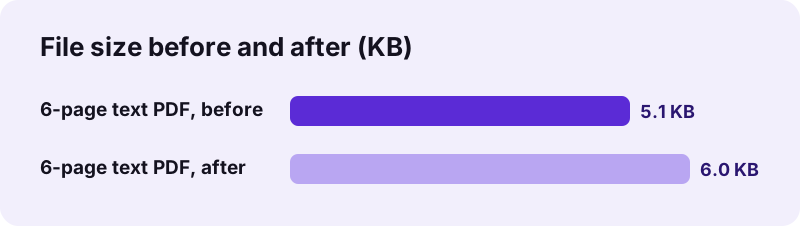
pdf24 add a watermark measured on two files
To test pdf24 add a watermark, we stamped a 6-page text document of 5.1 KB with the defaults: the job took 0.1 seconds and the file grew to 6.0 KB. A 4-page scan of 8.07 MB took 0.2 seconds and grew by only 870 bytes, because the text and font are tiny compared with the page photos. Page count and text stayed unchanged in both files.
pdf24 add a watermark on a phone
On Android and iPhone the options are the same form fields as on a computer. The keyboard opens for the text, and the drop-down lists for opacity, angle and colour use the phone's own picker. The stamped file saves to Downloads or Files.
pdf24 add a watermark on Windows and Mac
On a computer the tool runs in Chrome, Edge, Firefox or Safari with nothing to install. Large batches go fastest one after another in the same tab, because the PDF engine stays loaded after the first file.
pdf24 add a watermark: size tip for long words
At 60 pt, CONFIDENTIAL spans most of an A4 page diagonally. For longer text, such as a company name with 20 letters or more, drop to 36–48 pt so the ends do not run off the page; for short words like COPY, 90–120 pt fills the page well.
Which settings make pdf24 add a watermark readable but discreet?
The watermark is easiest to live with at 20 % opacity in grey: readers see it at once, yet the text below stays fully legible on screen and on paper. Use 35 or 50 % for documents that must never pass as originals, and 10 % for a faint mark on presentation handouts or photo proofs.
| Purpose | Text | Size | Opacity | Colour |
|---|---|---|---|---|
| Internal draft | DRAFT | 90 pt | 20 % | Grey |
| Confidential report | CONFIDENTIAL | 60 pt | 20 % | Red |
| Copy for a rental or visa file | COPY – for rental application only | 28 pt | 35 % | Grey |
| Proof for a client | PROOF | 100 pt | 10 % | Blue |
| Specimen document | SPECIMEN | 70 pt | 50 % | Red |
pdf24 add a watermark on ID copies
When you send a copy of an ID card or passport to a landlord or an agency, pdf24 add a watermark can stamp a line that names the receiver and the purpose, making the copy less useful to anyone else. Write it at 0° across the photo area, for example Copy for Atlas Rentals, 11/2026, at 35 % opacity.
pdf24 add a watermark: what kind of watermark it is
The word watermark comes from paper. In a PDF it means a visible stamp drawn over the page, which is what this tool makes. It is not a hidden digital watermark that tracks a file, and it is not a security feature on its own.
“Watermarks have historically been used on postage stamps, currency, and other official documents to discourage counterfeiting.”
pdf24 add a watermark and removal by others
Whatever you type in pdf24 add a watermark becomes real text in the page content; in our test the word CONFIDENTIAL could be found by search afterwards. A determined person with an editor can delete such text. To make removal much harder, convert the stamped pages to images with Rasterize PDF, which burns the mark into the picture but also makes the body text unselectable.
pdf24 add a watermark compared with hidden digital watermarks
A digital watermark in the technical sense is invisible data hidden in an image or a sound to prove ownership. This tool does not hide anything; everything it adds is visible. For proof of who received a file, a visible line that names the receiver works better in practice.
Is pdf24 add a watermark private?
The stamping in pdf24 add a watermark runs in your browser: the PDF is read from your device, the text is drawn by JavaScript, and the new file is written locally. Our result lines read 0 bytes uploaded for both test files. Reports, HR files and ID copies therefore never pass through a server while you add a watermark.
The only downloads are the page and the PDF engine; the Helvetica font is built into every PDF reader and needs no file. The File API on MDN explains how a page reads a local file without sending it.
pdf24 add a watermark: limits
A few honest limits, with the tool that covers each case.
- Text only: for a logo watermark, place a PNG with Edit PDF or lay one PDF over another with Overlay PDF.
- Latin letters, digits and common accents only; other characters are left out and a note says so.
- One line, always centred; no tiling across the page.
- Every page gets the mark; to stamp only some pages, split them out with Split PDF first.
- Password-protected files need Unlock PDF before stamping.
pdf24 add a watermark: frequently asked questions
Is pdf24 add a watermark free?
Yes. Stamping a watermark on pdf24tools costs nothing and needs no account. There is no limit on pages or files and the tool adds nothing besides the text you choose. All the work runs in your browser, so there is no server to pay for.
Can pdf24 add a watermark use my own text?
Yes. Delete CONFIDENTIAL and type any words, such as DRAFT, COPY, a company name or a sentence that names the receiver. The text can include Latin letters, digits and common accents like é or ü. Characters outside that set are left out, and a note tells you.
Does pdf24 add a watermark upload my PDF?
No. The file is opened and stamped by your browser on your device. Both of our test runs showed 0 bytes uploaded on the result line, and nothing is stored after you close the tab. The page downloads only its own code and the PDF engine.
Can pdf24 add a watermark put a logo on a PDF?
No, it stamps text only. For a logo, use Edit PDF: choose Image, pick a transparent PNG of your logo and place it on the page. To repeat a logo page on every page, Overlay PDF can lay a one-page PDF with the logo over each page of your document.
Can I watermark only some pages with pdf24 add a watermark?
The tool stamps every page. To mark only part of a document, extract those pages with Split PDF, watermark them, and join everything back in order with Merge PDF. For one or two pages, Edit PDF lets you type a large note by hand instead.
Can someone remove a watermark from pdf24 add a watermark?
Yes, with effort. The mark is real text drawn on the page, so an editing program can delete it. For stronger protection, rasterize the stamped file so the mark is part of each page picture, and send it with a password set by Lock PDF.
Does pdf24 add a watermark change the file size?
Barely. Our 6-page text document grew from 5.1 KB to 6.0 KB, and an 8.07 MB scan grew by 870 bytes. The tool uses Helvetica Bold, a standard font that every PDF reader already has, so no font file has to be embedded.
Can pdf24 add a watermark make the text horizontal?
Yes. Choose 0° for horizontal text, or −45° for a diagonal running from top-left to bottom-right. The default of 45° runs from bottom-left to top-right, the classic look. The mark is always centred on the page whatever angle you pick.
Will the pdf24 add a watermark text print?
Yes. The watermark is part of the page content, so every printer and print dialog includes it. Grey at 20 % prints as a light grey, readable without hiding the text. On some office printers, very light 10 % marks may print fainter than on screen.
Does pdf24 add a watermark work on scanned PDFs?
Yes. Scanned pages are pictures inside the PDF, and the watermark text is drawn on top of them. Our 4-page scan was stamped in 0.2 seconds. The result is a mix: the watermark is searchable text, while the scanned words remain an image until you run OCR.
Can I use pdf24 add a watermark on a phone?
Yes. The page works in Chrome, Safari, Edge and Firefox on Android and iPhone, with the same options as on a computer. Type the text with the phone keyboard, pick the options from the drop-down lists, press the button and save the file to Downloads or Files.
Who makes the pdf24 add a watermark tool?
The pdf24tools team makes it. pdf24tools is an independent website and is not affiliated with PDF24 or Geek Software GmbH. Our watermark tool was built separately and runs in your browser; this page describes only what it does, measured with our own test files on 2026-11-02.
pdf24 add a watermark: sources
- Watermark — Wikipedia
- Digital watermarking — Wikipedia
- File API — MDN Web Docs