How to use pdf24 copy from PDF in 4 steps
- Open the PDF. Choose the file or drop it on the box.
- Keep or drop page markers. Leave the page-break option on to get lines such as --- Page 2 --- between pages, or turn it off for one continuous text.
- Press the button. The text of every page appears in a box below, in reading order, line by line.
- Copy or save. Press Copy all text to put it on the clipboard, or download the .txt file.
What text does pdf24 copy from PDF extract?
pdf24 copy from PDF takes the text layer of every page, the same text a viewer lets you select, and joins it into lines in reading order. Page markers separate the pages if you keep that option on. Text inside images and scanned pages is not included, because those pages contain pictures, not letters.
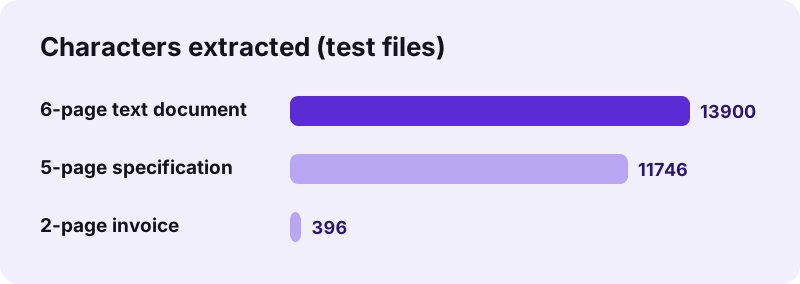
| Test file | Pages | Characters | Words | Time |
|---|---|---|---|---|
| Text document | 6 | 13,900 | 1,968 (incl. page markers) | 0.6 s |
| Specification | 5 | 11,746 | 1,920 | 0.5 s |
| Invoice with a table | 2 | 396 | 74 | 0.6 s |
| Scanned pages | 4 | 0 | — | Message: use OCR |
pdf24 copy from PDF and tables
Table rows come out as lines with the cells separated by spaces: our invoice gave Laptop stand 2 25.50 51.00 for one row. That pastes cleanly into an e-mail. For rows and columns you can calculate with, PDF to Excel keeps each value in its own cell.
pdf24 copy from PDF on a phone
Selecting text in a phone PDF viewer means dragging small handles across page breaks. Here one tap on Copy all text puts the whole document on the clipboard, ready to paste into a note, a chat or a translation app.
pdf24 copy from PDF on a computer
On a computer, paste the text into a word processor or editor. The .txt file is saved as UTF-8 with Windows line endings, so it opens correctly in Notepad, TextEdit and every code editor, with accents and non-Latin letters intact.
pdf24 copy from PDF tip: copy one page only
Keep the page markers on, then select from one --- Page n --- line to the next inside the text box and copy that part. For a separate file per page, cut the pages first with Split PDF.
Why does pdf24 copy from PDF find no text?
pdf24 copy from PDF reports no text layer when the PDF is a scan or a set of photos: the pages show letters, but the file stores only pictures of them. Our 4-page scanned test file gave exactly that message. Run OCR first, which recognises the letters and adds the missing text layer.
| Symptom | Cause | Fix |
|---|---|---|
| No text layer message | Scanned or photographed pages | OCR PDF, or choose its Text output to get a .txt directly |
| Strange symbols instead of letters | Font without a proper character map | OCR the pages, which reads what is shown |
| Columns mixed together | Two-column layout read line by line | Split the page, or copy column by column in your viewer |
| Password message | Encrypted file | Unlock PDF first |
pdf24 copy from PDF compared with other ways to get text
Copying by hand in a viewer works for a sentence. For whole documents, extraction is faster and does not lose text at page breaks. The clipboard is the usual destination.
“the copy command creates a duplicate; in both cases the selected data is kept in temporary storage called the clipboard.”
| You want | Tool |
|---|---|
| Plain text of all pages, fast | pdf24 copy from PDF (this page) |
| Text with headings and lists kept | PDF to Markdown |
| An editable document with layout | PDF to Word |
| A .txt file to keep | PDF to TXT or the download here |
| Text from a scan | OCR PDF |
pdf24 copy from PDF for translation, quotes and notes
Plain text is what most other tools want as input. Extracting it once and pasting it where it is needed avoids retyping and the errors that come with it.
- Translation: paste the text into a translation tool page by page, using the page markers to keep track.
- Quotes and citations: copy a passage exactly, then note the page from the nearest --- Page n --- line.
- Notes and summaries: paste a report into your notes app and highlight what matters there.
- Word counts: paste into a word processor to count words of a PDF essay or article.
- Accessibility: plain text works with screen readers and text-to-speech apps that cannot open a PDF.
When the text needs cleaning, such as hyphenated words at line ends, a quick find-and-replace in your editor fixes it. pdf24 copy from PDF keeps the line breaks of the original layout, so you can see where each line ended.
Is pdf24 copy from PDF private?
pdf24 copy from PDF reads the file and extracts its text in your browser, so the document and its words never leave your device. Our result lines read 0 bytes uploaded. The text sits in the page and on your clipboard only, which matters for contracts, medical letters and anything you plan to paste elsewhere.
The page loads its own code and the PDF engine once. Copying uses the browser's clipboard feature, which asks for no extra permission when you press the button yourself. See the File API on MDN for how a page reads a local file without sending it.
pdf24 copy from PDF: frequently asked questions
Is pdf24 copy from PDF free?
Yes. Extracting text on pdf24tools is free, with no account and no limit on files or pages. The work runs in your own browser, so there is no server cost. Copy the text of as many documents as you like, one after another in the same tab.
Does pdf24 copy from PDF upload my document?
No. The browser reads the file and extracts the text on your device; our tests showed 0 bytes uploaded. Only the page and the PDF engine are downloaded. The text exists in the page, on your clipboard if you copy it, and in the .txt file if you save it.
Can pdf24 copy from PDF copy text from a scan?
Not directly, because a scan has no text layer; the tool says so and suggests OCR. Run OCR PDF on the scan, then copy from the OCR copy, or choose the Text output in OCR PDF to get a .txt file straight away.
Does pdf24 copy from PDF keep the formatting?
No, the result is plain text: line breaks and page markers are kept, but fonts, bold, colours and images are not. For a document that keeps headings and lists, use PDF to Markdown; for layout, PDF to Word. Links are kept only as their visible text.
What are the page lines in pdf24 copy from PDF?
With the page-break option on, each page starts with a line such as --- Page 2 ---. They help you find where a passage came from and copy one page at a time. Turn the option off for one continuous text without markers.
How do I copy all text with pdf24 copy from PDF?
Press the button to extract, then press Copy all text under the box. The button label changes to Copied once the text is on the clipboard. Paste it anywhere with Ctrl+V, Cmd+V or a long press on a phone. If the browser blocks the clipboard, the text in the box is selected, so a normal copy shortcut still works.
Can pdf24 copy from PDF copy tables?
Yes, as lines of text: each row becomes a line with its cells separated by spaces, such as Laptop stand 2 25.50 51.00 in our invoice. To keep each value in its own cell for calculations, use PDF to Excel instead.
Why does pdf24 copy from PDF mix two columns?
Text in a two-column layout can be stored line by line across the page, so lines from both columns alternate. Split the page into halves with Halve PDF pages and copy each half, or select one column by hand in your PDF viewer.
Can I use pdf24 copy from PDF on iPhone?
Yes. Open the page in Safari or Chrome, choose the PDF from Files, press the button and tap Copy all text. Paste into Notes, Mail or a chat. The .txt download saves to Files if you want to keep the text. No app or account is needed for any of these steps.
Does pdf24 copy from PDF work with Arabic or Chinese text?
Yes, as long as the PDF stores real text in those scripts. The text box and the UTF-8 .txt file keep every Unicode character. Right-to-left lines are stored in logical order, which is what editors and translation tools expect.
How long does pdf24 copy from PDF take?
Under a second for typical documents: 0.6 seconds for our 6 pages and 13,900 characters, 0.5 seconds for a 5-page specification. Documents with hundreds of pages take a few seconds, and a progress line shows which page is being read.
Who makes the pdf24 copy from PDF tool?
The pdf24tools team makes it. pdf24tools is an independent website and is not affiliated with PDF24 or Geek Software GmbH. Our text extraction tool was built separately and runs in your browser; this page describes it only from our own tests with our own files. All numbers on this page come from runs made on 2026-11-02 with Chrome on a Windows laptop.
pdf24 copy from PDF: sources
- Cut, copy, and paste — Wikipedia
- Clipboard (computing) — Wikipedia
- File API — MDN Web Docs