How to use pdf24 remove PDF metadata in 4 steps
- Choose the PDF. Tap Choose PDF file or drop the PDF on the box. It is read from your disk and not uploaded.
- Check what was found. The panel lists the current title, author, subject, keywords, creator and producer, so you see what is about to go.
- Keep Remove all metadata selected and press the button. The Info dictionary, the XMP packet and PieceInfo data are deleted and the file is saved again.
- Download the clean copy. Save the -clean.pdf file. Check it in your reader's document properties: the fields are empty.
What does pdf24 remove PDF metadata delete?
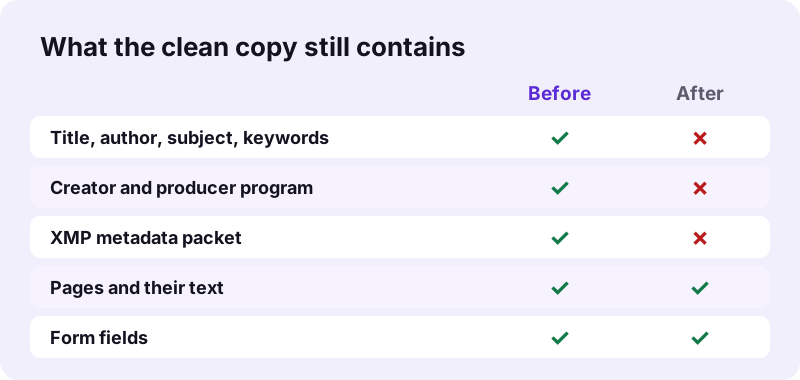
pdf24 remove PDF metadata empties the document Info dictionary, which holds title, author, subject, keywords, creator, producer and the two dates, and it deletes the XMP metadata stream plus PieceInfo editing data at file and page level. Our pg-meta.pdf test file had six filled fields and an XMP packet; afterwards both were gone.
| Field | Before | After |
|---|---|---|
| Title | Secret project plan | (none) |
| Author | Jane Roe | (none) |
| Subject | Budget 2027 | (none) |
| Keywords | internal, draft | (none) |
| Creator | SampleWriter 1.0 | (none) |
| Producer | SampleProducer 2.0 | (none) |
| XMP packet (/Metadata) | Present | Removed |
“Metadata (or metainformation) is data (or information) that defines and describes the characteristics of other data.”
pdf24 remove PDF metadata and the XMP packet
Many programs write the same facts twice: once in the classic Info dictionary and once in an XML block called XMP, which can also carry edit history, document IDs and the name of the template. Removing only the Info fields would leave the XMP copy behind, so the tool deletes both. More on the format: Extensible Metadata Platform.
pdf24 remove PDF metadata on iPhone and Android
The tool runs in Safari, Chrome, Edge and Firefox on phones. Because it only rewrites a few small objects, even a long PDF is cleaned almost instantly; our three test files took between 0.08 and 0.11 seconds each on a laptop.
pdf24 remove PDF metadata on Windows and Mac
Windows shows PDF author and title in File Explorer columns and macOS shows them in Finder's Get Info window. After cleaning, those columns stay blank for the new file, since there is nothing left to read.
pdf24 remove PDF metadata: tip before you send
Make cleaning the last step. Merging, signing or editing in another program often writes a fresh producer name and new dates, so clean the final version just before you email or upload it.
What does pdf24 remove PDF metadata not remove?
pdf24 remove PDF metadata leaves the visible content alone: page text, headers, footers, images, form field values, comments and file attachments all stay. Names typed into comments, EXIF data inside embedded photos and text hidden under white boxes are part of the content, not the document info, so they need other tools to remove them.
- Page text: kept (69 characters in pg-meta.pdf, 366 in invoice-v1.pdf, identical after).
- Form fields: kept (all 6 fields of form.pdf survived).
- Comment author names: kept, delete or flatten the comments first.
- Photos inside the PDF: kept as they are, including any camera data stored in them.
- Hidden text under boxes: kept; use Redact PDF to remove it for good.
To black out names or numbers inside the pages, use Redact PDF. To burn comments into the page so their author fields disappear, use Flatten PDF before cleaning.
Why use pdf24 remove PDF metadata before sharing a file?
Hidden document info can reveal more than the pages do: the real author behind an anonymous submission, the draft title of a contract, the software and version used, or the date a file was really created. Cleaning metadata closes that leak for job applications, peer reviews, tenders, legal filings and public downloads.
- Blind peer review: no author name in the file.
- Job applications: no old employer in the creator template.
- Tenders and offers: no internal project name in the title.
- Website downloads: no staff names exposed to search engines.
Search engines and document viewers display the title field when it exists, so a leftover title such as Secret project plan can appear in results. If you want a public title instead of none, use Change PDF info to write your own.
pdf24 remove PDF metadata for anonymous review
Journals and conferences that run double-blind review ask authors to strip identifying data. Clean the PDF here, then open its document properties and confirm that author, creator and producer show nothing.
Is pdf24 remove PDF metadata safe for confidential files?
pdf24 remove PDF metadata processes the file only on your own device: the browser reads it with the File API, pdf-lib edits it in memory and the clean copy downloads straight back. Every test run reported "0 bytes uploaded", so the author names and titles you are removing are never seen by a server either.
Uploading a file to a server to remove private details would defeat the purpose; local processing avoids that. You can load the page, disconnect from the network, and the tool still works.
Password-protected PDFs need to be opened first with Unlock PDF. After cleaning, add a password again with Lock PDF.
pdf24 remove PDF metadata: measured results
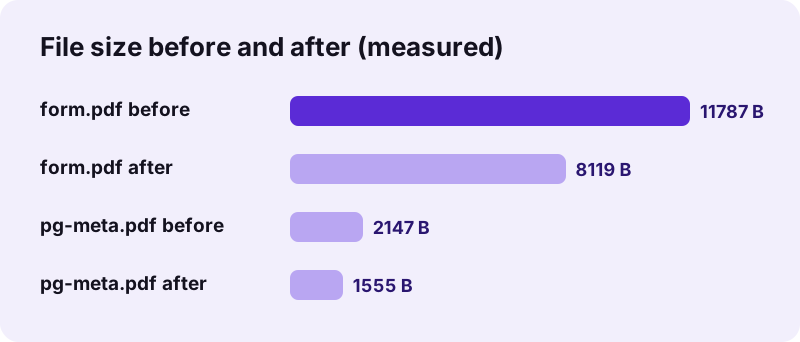
pdf24 remove PDF metadata cleaned three test files in 0.08 to 0.11 seconds each in Chrome, and every output was smaller than its input, because the save also drops objects no page uses. Page count and text length were identical before and after in all three runs.
| Test file | Before | After | Time | Fields left |
|---|---|---|---|---|
| pg-meta.pdf (3 pages, 6 fields + XMP) | 2,147 bytes | 1,555 bytes | 0.11 s | 0 |
| form.pdf (1 page, 6 form fields) | 11,787 bytes | 8,119 bytes | 0.10 s | 0 |
| invoice-v1.pdf (2 pages) | 2,440 bytes | 1,616 bytes | 0.08 s | 0 |
Unlike many PDF writers, the tool does not stamp its own name into the producer field: the clean files had an empty Info dictionary, not one that says which tool cleaned them.
pdf24 remove PDF metadata not working? Fixes
When metadata still shows after cleaning, the viewer is usually reading another copy: the old file, a cached preview, or a file name that holds the information. Check the table for the symptom you see; most cases are solved in a minute without running the tool a second time.
| Symptom | Cause | Fix |
|---|---|---|
| Title still shows in the reader | Old file opened, or the reader shows the file name | Open the -clean.pdf file and check Properties |
| Explorer or Finder shows old author | Preview cache | Refresh the folder or rename the file |
| Error before cleaning | Password-protected file | Unlock PDF first |
| Name still visible on a page | It is page content, not metadata | Use Redact PDF |
The file name itself is not metadata inside the PDF. Rename the download if it contains a name or date you do not want to share.
pdf24 remove PDF metadata: frequently asked questions
Is pdf24 remove PDF metadata free?
Yes. pdf24 remove PDF metadata on pdf24tools costs nothing, needs no account and adds no watermark or producer stamp. There is no daily limit, because the cleaning runs in your own browser rather than on a server. Clean as many files as you need and keep every result.
Which fields does pdf24 remove PDF metadata delete?
All entries of the document Info dictionary: title, author, subject, keywords, creator, producer, creation date and modification date. It also deletes the XMP metadata stream of the document and of each page, and the PieceInfo data some editors use to store private editing information. Pages and their content are untouched.
Does pdf24 remove PDF metadata change the pages?
No. Text, images, fonts, links, bookmarks and form fields stay exactly as they were. In our tests the page count and the amount of text were identical before and after: 69 characters on pg-meta.pdf, 366 on invoice-v1.pdf, and all 6 form fields of form.pdf were still there.
Is my PDF uploaded by pdf24 remove PDF metadata?
No. The browser reads the PDF from your disk with the File API and the metadata is deleted in memory on your device. The result shows 0 bytes uploaded, nothing is stored, and closing the tab clears the data. That matters most for exactly the files where metadata is sensitive.
Does pdf24 remove PDF metadata remove names from comments?
No. A comment or sticky note stores the commenter's name inside the annotation, which is page content rather than document info. Delete the comments in your reader, or burn them into the page with Flatten PDF, and then remove the metadata, so no author name is left anywhere in the file.
Why is the file smaller after pdf24 remove PDF metadata?
The XMP packet alone can be several kilobytes, and saving the file again also drops objects that no page refers to. Our form.pdf went from 11,787 to 8,119 bytes and pg-meta.pdf from 2,147 to 1,555 bytes. The pages themselves are not compressed or changed in quality.
Does pdf24 remove PDF metadata work on a phone?
Yes. pdf24 remove PDF metadata runs in Safari on iPhone and iPad and in Chrome, Edge or Firefox on Android. Since only a few small objects are rewritten, files finish almost instantly, even long ones. Save the clean copy to Files or Downloads and share it from there instead of the original.
Can I set new values instead of using pdf24 remove PDF metadata?
Yes. If you want a clean public title or a company name as author instead of empty fields, use Change PDF info, which lets you type each field. It also deletes the old XMP packet, so readers show your new values rather than the old ones stored in the XML copy.
Does pdf24 remove PDF metadata remove a digital signature?
A signed PDF is protected against changes, and saving it again with new metadata breaks the signature's check. Remove metadata before you sign, never after. If a file is already signed and must stay valid, keep it as it is or ask the signer for an unsigned copy to clean first.
Is pdf24tools the official pdf24 remove PDF metadata tool?
No. pdf24tools is an independent website and is not affiliated with PDF24 or Geek Software GmbH. Our metadata remover is our own build on the open-source pdf-lib library, running entirely in your browser. The page name only describes the search people use when they want hidden PDF details gone.
How do I check the result of pdf24 remove PDF metadata?
Open the clean file and look at its document properties: File › Properties in Acrobat Reader, or Get Info on a Mac. Title, author, subject, keywords, creator and producer should be empty. Our own check used pypdf, which found no Info fields and no XMP stream in any output.
Does pdf24 remove PDF metadata keep the file name?
The download is named after your file with -clean added, for example report-clean.pdf. The file name is not stored inside the PDF's metadata, so if it contains a person's name or a date, rename the downloaded file before sending it, as no tool can clean that for you.
pdf24 remove PDF metadata: sources
- Metadata — Wikipedia
- Extensible Metadata Platform — Wikipedia
- File API — MDN Web Docs