How to use pdf24 flatten PDF in 4 steps
- Choose the PDF. Tap Choose PDF file or drop the filled form or commented document on the box. It is read on your device.
- Pick what to flatten. Form fields and annotations keeps the text layer. Everything turns each page into one picture, at 100, 150, 200 or 300 DPI.
- Press the button. The values are drawn into the page content and the interactive layer is removed. Most files finish in under a second.
- Download and check. Save the -flat.pdf file and click into a field: nothing should be editable any more, and every answer should still be visible.
What does pdf24 flatten PDF do to a form?
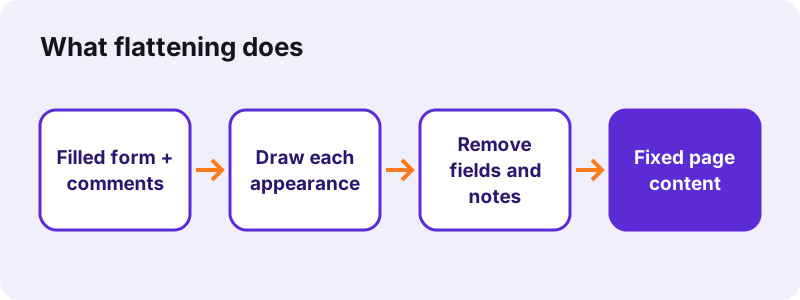
pdf24 flatten PDF draws the current appearance of each form field, such as typed text, a ticked box or a chosen list entry, into the page itself, then deletes the field. Our test form had 5 fields on 6 widgets; afterwards it had 0 fields, and all 67 characters of page text were still selectable.
| Test file | Mode | Before | After | Result line |
|---|---|---|---|---|
| form.pdf (5 fields) | Fields and annotations | 11,787 bytes | 8,344 bytes | 5 form field(s) and 0 annotation(s) are now part of the page |
| pg-annots.pdf (highlight + free-text note) | Fields and annotations | 1,883 bytes | 2,180 bytes | 0 form field(s) and 2 annotation(s) |
| text-6p.pdf (no fields) | Fields and annotations | 5,238 bytes | 4,341 bytes | Nothing to flatten |
| form.pdf (5 fields) | Everything, 150 DPI | 11,787 bytes | 38,214 bytes | Every page is now a single picture |
pdf24 flatten PDF for text fields, checkboxes and lists
Every field type becomes a drawing of its current state: a text box keeps the typed words in its font, a checkbox keeps its tick, a radio group keeps the chosen dot, and a drop-down keeps the visible choice. In our form the country list showed France, and the word France stayed on the page as normal text.
pdf24 flatten PDF on iPhone and Android
Fill the form in your phone's PDF app or in Fill out PDF, then open this page in Safari or Chrome and choose the saved file. Flattening a one-page form took a quarter of a second on a laptop, so a phone also finishes almost at once.
pdf24 flatten PDF on Windows and Mac
No software is needed on Windows, macOS or Linux; the tool runs in Chrome, Edge, Firefox or Safari. It replaces the "print to PDF" trick that many people use to flatten, without the risk of the printer driver changing margins or fonts.
pdf24 flatten PDF: tip before sending a form
Keep an unflattened copy. Once the fields are gone, a typo can only be fixed by editing the page; with the original you simply correct the field and flatten again.
Which annotations does pdf24 flatten PDF burn in?
The default mode of pdf24 flatten PDF burns in every annotation that has its own appearance: highlights, underlines, free-text notes, stamps, ink drawings and shapes. Links and pop-up windows are left alone, because a link has nothing to draw. Our sample's highlight and free-text note became page content, and the note's words stayed searchable.
- Burnt in: highlight, underline, strike-out, free text, stamp, ink, rectangle, circle, line.
- Kept as they are: links and pop-up note windows.
- Kept as they are: rare annotations with no appearance stream, because there is nothing to draw.
- Form fields: always flattened in both modes.
To add comments before flattening, use Annotate PDF; to place a signature image, use Sign PDF. Flattening afterwards fixes both on the page.
pdf24 flatten PDF: fields and annotations or everything?
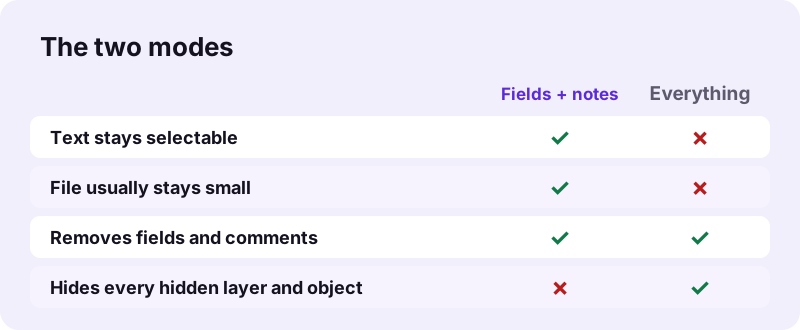
The two modes of pdf24 flatten PDF differ in what survives. Form fields and annotations keeps text and vector graphics, so the file stays small and searchable. Everything renders each page into one JPEG picture, which also hides layers, hidden objects and odd form scripts, but text can no longer be selected and the file usually grows.
“is the task of taking an image described in a vector graphics format (shapes) and converting it into a raster image”
| Everything mode resolution | Use it for |
|---|---|
| 100 DPI | Smallest file, screen reading |
| 150 DPI (default) | Screen and email |
| 200 DPI | Good print |
| 300 DPI | Sharp print, small text |
pdf24 flatten PDF when a form still looks editable
Before flattening, the tool asks pdf-lib to redraw each field's appearance from its value, and keeps the old appearance if that fails. If a field still comes out blank or in the wrong font, run the original with Everything: the page is drawn the way the viewer renders it, at the resolution you pick.
Why flatten a PDF with pdf24 flatten PDF?
Running pdf24 flatten PDF is the safe last step before a filled form or a reviewed document leaves your hands. Without it, the recipient's reader may show fields differently, values can be changed by anyone, and comments can be hidden or deleted. A flat file prints and displays the same everywhere.
- Send a completed application that nobody can alter by accident.
- Make values show in viewers that do not render form fields well, such as some phone apps.
- Fix review comments and stamps into a final version.
- Prepare a form for merging or printing, where loose fields can shift or vanish.
After flattening, Merge PDF and Compress PDF treat the answers as normal page content, so they no longer get lost in later steps.
Is pdf24 flatten PDF safe for filled forms?
pdf24 flatten PDF reads the file with the browser File API and runs pdf-lib on your own device, so names, addresses, ID numbers and signatures in a form never travel to a server. All four of our test runs reported 0 bytes uploaded, and closing the tab clears the file from memory.
Flattening is not redaction. Values you can see stay readable, and the first mode keeps them as selectable text. To remove information for good, use Redact PDF.
pdf24 flatten PDF not working? Fixes
Three situations cause most trouble when flattening: the file has nothing to flatten, it is password-protected, or its fields keep their values in a way the first mode cannot draw. The result line tells you which one applies, and the table lists the fix for each case.
| What you see | Cause | Fix |
|---|---|---|
| No form fields or annotations to flatten | The file is already flat | Nothing to do; the copy is identical in content |
| Password error | Encrypted file | Unlock PDF first |
| A field comes out empty or odd | Unusual field appearance or font | Use the Everything mode |
| File will not open | Damaged structure | Repair PDF, then flatten |
pdf24 flatten PDF: frequently asked questions
Is pdf24 flatten PDF free?
Yes. pdf24 flatten PDF costs nothing, needs no account and puts no watermark on the pages. There is no daily limit, because the work runs on your own device rather than on a server. Flatten as many forms and commented files as you need and keep every result.
Does pdf24 flatten PDF keep text selectable?
In the default mode, yes. Field values and the page's own text stay real text, so you can still search and copy them. Our test form kept all 67 characters of its text layer. Only the Everything mode turns pages into pictures, and then text can no longer be selected.
Can a form be edited again after pdf24 flatten PDF?
Not as a form. After pdf24 flatten PDF the fields no longer exist, so there is nothing to click and type into. The page can still be changed with a PDF editor, like any page, but the original answers cannot be switched back to fields. Keep an unflattened copy if you may need corrections.
Does pdf24 flatten PDF upload my form?
No. The file is read from your disk with the browser File API and processed in memory with pdf-lib. The result line shows 0 bytes uploaded, and nothing is stored after you close the tab. That matters for forms with ID numbers, bank details and signatures.
What does pdf24 flatten PDF do with comments?
Highlights, free-text notes, stamps, ink drawings and shapes are drawn into the page and the comment objects are deleted, so they cannot be hidden, moved or removed. In our test both annotations of the sample file were burnt in and the note's words stayed searchable as page text.
Does pdf24 flatten PDF keep links?
Yes. Links are not drawn content, so the tool leaves them in place and they keep working after flattening. The Everything mode is different: it keeps only a picture of each page, so links, bookmarks inside pages and any remaining interactive parts are gone in that mode.
Why did pdf24 flatten PDF make my file bigger?
Two reasons are possible. Burnt-in annotations add their drawing to the page, which cost 297 bytes on our sample. The Everything mode replaces vector pages with pictures, so a one-page form grew from 11.5 KB to 37 KB at 150 DPI. The default mode often makes forms smaller: 11.5 KB became 8.1 KB.
Does pdf24 flatten PDF work on a phone?
Yes. It runs in Safari on iPhone and iPad and in Chrome, Edge or Firefox on Android. Pick the filled form from Files, Downloads or a cloud drive, flatten it and save the -flat.pdf copy. A one-page form finishes in about a second, because the work is very light.
Is pdf24 flatten PDF the same as print to PDF?
The result is similar, but this tool keeps more. Printing to PDF can change page size, margins and fonts depending on the printer driver. The default flatten mode keeps the original pages and fonts and only removes the editable layer.
Can pdf24 flatten PDF handle a signed document?
It can flatten it, but the digital signature will no longer be valid, because any change to a signed PDF breaks the signature. Flatten the form first, then sign the flat file. A drawn or image signature placed with Sign PDF is simply fixed into the page.
Does pdf24 flatten PDF need a password for protected files?
An encrypted PDF must be unlocked before it can be flattened. Use Unlock PDF with the password, flatten the unlocked copy, and lock it again with Lock PDF if the recipient expects a password. Do this only with files you are allowed to change.
Is pdf24tools the official pdf24 flatten PDF tool?
No. pdf24tools is an independent website and is not affiliated with PDF24 or Geek Software GmbH. Our flattener is our own build on the open-source pdf-lib and pdf.js libraries and runs entirely in your browser. The name only describes what people search for when they need a free way to flatten a form.
pdf24 flatten PDF: sources
- PDF — Wikipedia
- Rasterisation — Wikipedia
- File API — MDN Web Docs
- PDF (Portable Document Format) Family — Library of Congress